A site devoted to discussing techniques that promote quality and ethical practices in software development.

Friday, June 7, 2013

Way to customise Ubuntu locale settings

What started me on the journey to examine how to modify or customise the locale settings in Ubuntu began with a very trivial matter. I moved my Windows Thunderbird to Ubuntu Thunderbird.

Although the regional settings for my Ubuntu is already set to English (Australia), en_AU for those familiar with locale language, the time is still showing in 24 hours format. In Windows, the default is in 12 hours format and it is customarily in Australia to use the 12 hours format. I don't know how Ubuntu has got that wrong!

Hence the quest to correct this which turns out to be a major exercise diving into the bowel of Linux's way of dealing with locale wasting me several days for something we could do in seconds in Windows. At this point, I fully sympathise with Miguel De Icaza of his reason to move over to Mac OS.

There are no shortage of rants on the Internet about how primitive Linux/Ubuntu in catering for this not unusual customisation with some GUI support. Even if none, at least it should be better documented so that user can follow the steps. Unfortunately, the Internet is also fully of advices which range from working in some situations, or brute force work around, to some simply does not work any more.

This post is not to add more rant to an already heapful but to outline the steps one needs to go through to customise and here are the steps:

Step 1 - Identify the locale definition file you want to modify

If you are unfamiliar with way Ubuntu specifies locale information, you can visit this page.

In Ubuntu and other Linux, the locale formatting specification is based on the C-Library's strptime() specification. The same list of format specifiers can be found in the man page of date.

The specification for the locale is then stored in text format as locale definition file and one for each locale. They can be found in /usr/share/i18n/locales and the binary version is then recorded in an archive somewhere else.

So the first step to do that is locate the locale definition file in this directory. It is also a good practice to store your customised version here too.

Step 2 - Customise the setting(s)

Before you modify the settings, you can use the following command to view the format of items, for say the time/date display, of your locale:

      locale -ck LC_TIME

You can also use the same command without any parameter to view the current locale settings. We will come back to how they are specified in which file.

I assume that you are familiar with the syntax in the locale definition file. If not, you can study the precise definition here.

Identify the items you want to customise and as a good house keeping task make sure you change the file's:
  • Title to reflect that you have changed something
  • Change the version number, say from 1.0 to 1.05
  • Change the date.
This helps later on, particularly if you want to replace the existing locale definition with your customised version. More on this.

Step 2.1 - Decide how to use your change

Before you save the changes into the file, you need to decide what you want to do:
  1. Replace the existing locale with your customised version - this will impact on the system as well as per-user. Simply use the same file name.
  2. Keep your customised locale separate from the one you based on and you can then choose to apply this system-wide or on per-user basis. You need to save the changes to a different file name.
If you decide to use strategy No. 2, you need to understand the locale file name convention which is of the form:

    xx_YY@extra

where xx is the ISO-639 language code and YY is the ISO-3166 country code. The @extra is the bit that allows you to identify your customisation. Normally @extra is not used.  When you compile the locale definition file, that is the next step, you then specify the character set used in definition in the following convention:

   xx_YY.CHARSET@extra

where the CHARSET can be UTF-8, ISO-8859-1 or ASCII.

In my case all I want to do is to display time in 12 hours format and hence I modified the t_fmt and d_t_fmt as follows:
%
% Change "%T" to "%r"
t_fmt       "<U0025><U0072>"
%

% Change "%T" to "%r"
d_t_fmt     "<U0025><U0061><U0020><U0025><U0064><U0020><U0025><U0062><U0020><U0025><U0059><U0020><U0025><U0072><U0020><U0025><U005A>"

I also want to retain the system deployed setting and introduce my customisation as such. Hence I name my file as en_AU@mod.

Step 3 - Compile the locale definition file into the locale archive

This can be accomplished with the localedef command with super user privilege and the locale archive by default is located in /usr/lib/locale/locale-archive. This is a binary file but whose contents can be listed by using the following command:

     locale -av

To compile my customisation and to install it into the locale archive, I use the following command (assuming your current directory is in /usr/share/i18n/locales, the directory containing your modified definition file):

   sudo localedef -c -v -f UTF-8 -i en_AU@mod en_AU.UTF-8@mod

If you are replacing the system deployed file with your customised version, use the following variation:

   sudo localedef -c -v -f UTF-8 --replace -i en_AU en_AU.UTF-8

To verify your changes have been successfully installed into the locale archive, you can use the above mentioned locale command. This is where it will save you time if you have followed the above mentioned house keeping recommendations as your modified title/version/date are become evident.

If you are replacing the system deployed file with your customised version, all you have to do is to log out of your session and log back in.

You can use locale -ck LC_TIME (or whatever setting you have changed) to see if your customisation are compiled correctly.

Step 4 - Introduce your change on per user basis

You can select your customised locale definition by using the Ubuntu's Regional Formats in the Language Support applet or fondly known as gnome-language-selector. If you have named your customised definition file appropriately, it will show up in the list like this:

All you then have to do is to select that (as circled in red). Close the dialog and log out and log in to bring that into use.

What actually happens behind the scene is that it modifies or creates the ~/.pam_environment file that records the locale settings meeting your selection. This file is not there unless you have change the Regional Formats. In my case the LC_TIME becomes:
    LC_TIME=en_AU.UTF-8@mod

If you want to apply your change to the system, you simply modified the /etc/default/locale file.

Tuesday, May 21, 2013

Android is like the Windows XP days with little regards to user's protection

Months ago, I made a statement to my friends that effectively compared Android's operations or lack of security to the days of Windows XP and prior. The open neglect seems to follow the same excuse Windows use to make it easy for people to use. Now my observation is supported,
The Android threat landscape is starting to resemble that of Windows, according to F-Secure's Mobile Threat Report 
The Android threat landscape is growing in both size and complexity with cyber criminals adopting new distribution methods and building Android-focused malware services, according to a report from Finnish security vendor F-Secure.
The number of mobile threats has increased by nearly 50 percent during the first three months of 2013, from 100 to 149 families and variants, F-Secure said in its Mobile Threat Report for Q1 2013 that was released on Tuesday. Over 91 percent of those threats target the Android platform and the rest target Symbian.
What frightens me most and at the same annoying me is that when you install most applications, they demand access to your account, your phone, or other facilities that do not seem to be related to what the main function of the applications.

For example, I once wanted to install a PDF viewer and it demanded permission to access my phone contacts, etc. I have yet to see a PDF viewer in Linux/Windows demanding access to my Outlook or Thunderbird phone book, or my Google account. After all, it is just a program to render the PDF document and all it really need is read access to certain area where the document is held.

Then the other date I want to install a GPS logger but it too needed my Google Account, phone Contacts, phone logs, etc. Why? Is it just a program to jolt down the GPS location regular interval or on demand? All it really requires should be write access to the user's area and no more and no less.

If application demanding this kind of unnecessarily access of elevated privilege or to areas in Windows and Linux, they will be exposed as Trojan or Malware. But in Android, a form of Linux, it is an acceptable practice. Why?

As a result, I often do not install those applications that demand unreasonably access.

The only way to fix this rampant neglect of security is to turn everything off and then allowing the user to enable/disable access relating to features user requires. Ultimately it should be the responsibility of the phone owner. At the moment, the big switch is just too wide much like Windows XP where most people were using it without security.

XmlSerialization - why two runtime behaviour for class with read-only properties?

Following on from the previous blog post, and just to recap, there are at least two ways to write a class with read only property.

The old way is:

    [ Serializable ]
    public class PersonReadOnly {
        String m_Name;
        Int32 m_Age;
        public String Name {
            get{ return m_Name; }
        }
        public Int32 Age { 
            get{ return m_Age; }
        }

        public PersonReadOnly() {
        }

        public PersonReadOnly (String name, Int32 age) {
            this.m_Name = name;
            this.m_Age = age;
        }
    }

and the other way is to use private setter like this:

    [ Serializable ]
    public class PersonReadOnly1 {
        String m_Name;
        Int32 m_Age;

        public String Name {
            get{ return m_Name; }
            private set { m_Name = value; }
        }
        public Int32 Age { 
            get{ return m_Age; }
            private set { m_Age = value; }
        }

        public PersonReadOnly1() {
        }

        public PersonReadOnly1 (String name, Int32 age) {
            this.Name = name;
            this.Age = age;
        }
    }


These two classes functionally are the same. However, the XmlSerializer exhibits very different behaviour depending on how you write the class. This to me seem rather odd.

In the case of PersonReadOnly, there is no runtime exception, except that the state of the class, namely Name and Age, are not serialized as in agreement with the specification. So when the stream is deserialized, the values of Name and Age are that of the null and 0, respectively. Fair enough!

But when one writes the class as in the style promoted in PersonReadOnly1, the runtime behaviour is radically different. XmlSerializer throws the following InvalidOperationException, which is caused by the exception in sgen.exe,
System.InvalidOperationException: Unable to generate a temporary class (result=1).
error CS0200: Property or indexer 'TestSerialization.PersonReadOnly1.Name' cannot be assigned to -- it is read only
error CS0200: Property or indexer 'TestSerialization.PersonReadOnly1.Age' cannot be assigned to -- it is read only

   at System.Xml.Serialization.Compiler.Compile(Assembly parent, String ns, XmlSerializerCompilerParameters xmlParameters, Evidence evidence)
   at System.Xml.Serialization.TempAssembly.GenerateAssembly(XmlMapping[] xmlMappings, Type[] types, String defaultNamespace, Evidence evidence, XmlSerializerCompilerParameters parameters, Assembly assembly, Hashtable assemblies)
   at System.Xml.Serialization.XmlSerializer.GenerateTempAssembly(XmlMapping xmlMapping, Type type, String defaultNamespace)
   at System.Xml.Serialization.XmlSerializer..ctor(Type type, String defaultNamespace)
   at System.Xml.Serialization.XmlSerializer..ctor(Type type)
   at TestSerialization.TestXmlSerialization.SerializeClassWithNonPublicSetter_PersonReadOnly1() in E:\Projects\SerializationDemo2\TestSerialization\TestXmlSerialization.cs:line 74


The question is: should CLR exhibit the same runtime behaviour regardless of how the class is constructed?

Saturday, May 11, 2013

XmlSerializer - Difference in runtime behaviour between MS .Net and Mono runtime

There are several ways to define a class in C# with read-only properties.

You could define it like this:
    [ Serializable ]
    public class PersonReadOnly
    {
        String m_Name;
        Int32 m_Age;
        public String Name {
            get{ return m_Name; }
        }
        public Int32 Age { 
            get{ return m_Age; }
        }

        public PersonReadOnly()
        {
        }

        public PersonReadOnly (String name, Int32 age)
        {
            this.m_Name = name;
            this.m_Age = age;
        }
    }

This is the good old way of doing it. When this class is serialized using Xml Serialization, the values of the properties are not serialized.

Alternately, you can declare one with a private setter or using the auto-generated property syntax with private setter, like this:
    [ Serializable ]
    public class WithAutoPropertyReadOnly
    {
        public String Name { get; private set; }
        public Int32 Age { get; private set; }

        public WithAutoPropertyReadOnly() { }

        public WithAutoPropertyReadOnly( string name, Int32 age )
        {
            this.Name = name;
            this.Age = age;
        }
    }

The end result of this class WithAutoPropertyReadOnly is to produce private setters for properties Name and Age.

While WithAutoPropertiesReadOnly and PersonReadOnly classes are functionally the same, the runtime treatments in CLR (MS .Net) and Mono runtime are very different.

CLR and Mono differences
The Mono runtime used in this experiment is version 2.10.8.1 hosted in Ubuntu 12.04 LTS).

When one tries to construct an XmlSerializer object for the class WithAutoPropertiesReadOnly class, like this:
       XmlSerializer ser = new XmlSerializer( typeof(WithAutoPropertiesReadOnly) ); 

CLR runtime throws an exception of type InvalidOperationException while Mono blissfully serializes and deserializes with XmlSerializer in defiant of the specification.

This is dangerous as it introduces runtime differences that can affect cross-platform compatibility. Irrespective if the above piece of code is run in CLR or Mono, the same runtime behaviour should result.

This anomaly between CLR (runtime 2.0 & 4.0) and Mono only manifested by the presence of non-public property setter. In fact, the exception thrown in CLR is due to the runtime exception thrown by sgen.exe when the runtime tries to generate the temporary serialization DLL.

There is no disagreement when trying to serialize the class PersonReadOnly; both CLR and Mono yield the same result that the values for the properties are not serialized in Xml Serialization.


Tuesday, May 7, 2013

A bug in Jorte Calendar - Always showing am in the Task popup

This is clearly a bug in Jorte Calendar version 1.5.10 running in Android 4.x.

If you create a Task and assign the start or/and end times as somewhere in the pm, in the brief view, shown here, it always shows am:
Notice the time circled in red.

If one goes ahead and edit this task, the full editing view shows a different story:


The times are clearly defined as in the pm and not in the am. In fact, regardless if one defines the time as am or pm, the brief version dialog box always shows am.

It therefore appears to show that the programmer has failed to parse the times and to choose the am or pm at all! It seems they have left that at the default, which I guess is the am.

While this Calendar app is one of the better ones in the Google Play, its user interface leaves plenty to be desired. For example when defining time, why put the AM/PM selector on the left hand side of the numeral where most others by convention and by standard putting it on the right?

Back to the drawing board and hopefully someone will test it properly and while at it, put the AM/PM selector on the right hand side of the numerals please. Or better still in the locale correct location.

Sunday, March 31, 2013

Does anyone know how to get rid of the annoying obstruction in ZDNet in Android?

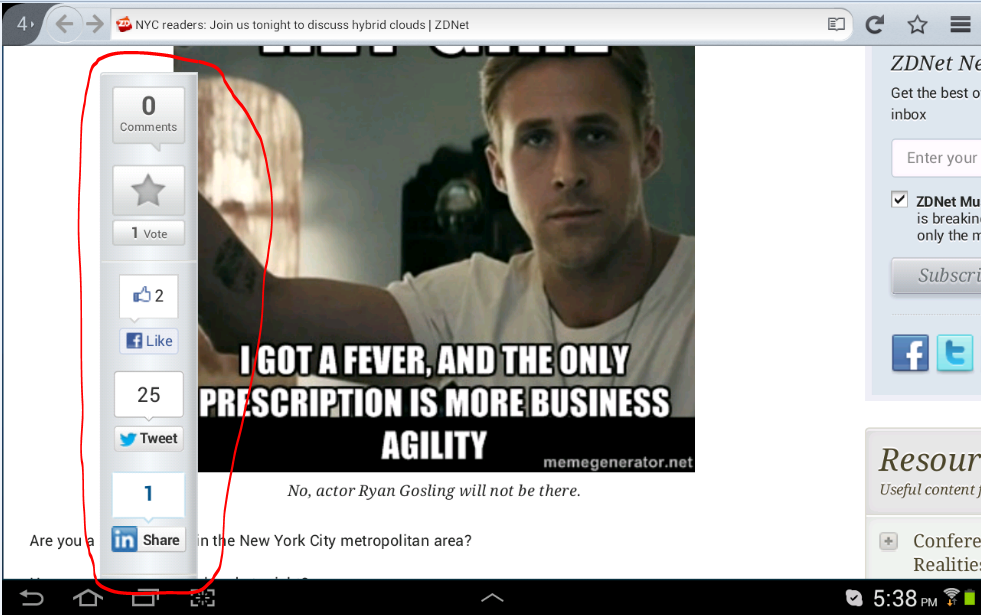
It seems ZDNet is more interested in annoying its visitors using Android to their web site. Perhaps their web designer does not know how to calculate the right place to put their 'toolbar' showing their comments, votes, Facebook likes etc.

An example using screen capture is probably the best way to illustrate this annoying problem that only seems to exist in ZDNet. I hope the disease does not spread to others.

It does not matter if I am using Firefox or Chrome in my Samsung Tab 10.1, the same annoyance appears when you zoom in on the page.

Here is what the page looks like without zooming in, the normal view:

The 'toolbar' is courteously tugged out of the way on the left hand side. But when you zoom in to the page, the toolbar begins to intrude on the main view - the article - as can be seen by this capture:

The toolbar circled in red begin to become the main focus of the page rather than any article. The bar moves to the right the more you zoom in to the page and becomes bigger, obstructing the more of the article. This is completely inconsiderate.

Can someone tell me what I can do or if there is any add-on to get rid of this kind of visual scum?

Wednesday, March 27, 2013

Does LibreOffice Team actually test their software for DOCX support?

I don't want to sound like ungrateful as I use and prefer to use LibreOffice even in Windows at those odd moments. I normally reside in Ubuntu and run LO 4.0.1.

As a developer when I see basic operations like this:
1) Create a LO Text file (ODT)
2) Write something and include some embedded graphics (Bitmap) into the document.
3) Then do a "Save as..." to a DOCX file.

failing to produce the correct result when one opens the docx in MS Office 2007, it is clearly a fault in the product or someone did not test their product.

Perhaps the LO team's definition of DOCX is text only file.

I am not sure if the graphic is missing or malformed. Since DOCX file is just a ZIP file, I can unzip the contents and the image file (.png) is awfully small. When one tried to open it, the viewer complaints about the corruption. This seems to indicate to me that their file converter has stuffed up the image in the process.

Surely the above steps must be described in their test procedure and user requirements. Yet the result, as echoed by voluminous chants for help in the Internet, seems to indicate that the LO Team do not include this most basic requirement in their test procedure. Otherwise, how could they not spot that missing graphic. I even doubt if they do test their product.

If LO cannot handle basic DOCX, they should branded that support as experimental or in beta mode and stop trying to make a case that it can handle DOCX file format. Doing so is highly irresponsible.

I am wondering how long will LO come around fixing this sought after bug-fix that has been around for as long as Open-Office/LibreOffice claiming to support DOCX.

Please do not include other fancy stuff and fix this most basic problem first as your product continues to wear a big cross for DOCX support.

Blog Archive