I have encountered a problem that has also been reported by many Netizens that they have experienced an annoyingly (some called it obscenely) long time to connect to their WiFi network when their Windows is woken from sleep. My laptop is running Windows 7 with all drivers up to date.
In my case, all WiFi connections are flagged 'Automatically Connect' and that the WiFi adapter did not have the "Allow the computer to turn off to save power" in the power management section selected.
When I wake my laptop up from sleep, the machine responses very swiftly and my desktop is restored. However, it frequently fails to automatically connected to the strongest signal WiFi nor initiates any attempt to connect; I have to manually press the connect button.
I have tested my machine with two distinctively different Wireless networks - different modems/routers and networking technologies and I have observed the same problem. Hence it is clearly the problem is in my laptop.
Prior to last month, my laptop's WiFi adapter connects to the network the moment I sign in after waking my machine up (< 10 seconds). Then suddenly the about mentioned problem occurs.
After some soul searching and searching the Internet, I have managed to rid this problem restoring it to its former glory. I am not suggestion nor recommending my way of solving my problem as a solution to deal with all long connection problems but you many review the materials to see if it can apply to your situation. It does not involve some drastic proposal found on the Net. IPv6 has nothing to do with this sluggish behaviour.
So what is the possible cause then? After some soul searching of what I did to my machine, I vaguely remember one evening I was investigating the Virtual WiFi Router that turns your laptop's WiFi Adapter into a wireless access point and that to understand the underlying mechanism, I was using the command line technique. In that experiment, I vaguely remember that I did not complete the whole process as I do not have a real need of it and that I might even have gotten the command sequence out of whack.
That experiment caused the "Microsoft Virtual WiFi Miniport Adapter" to appear in my Device Manager, albeit with a yellow triangle with an exclamation mark in it.
This gives me a clue that it might (just a might) be the cause of my problem - I therefore may have to disable or remove the miniport. So after some research, I have found the following instructions to disable the "Microsoft Virtual WiFi Miniport Adapter" and here are the steps (must be executed in a command prompt with Administrative rights):
1) To stop the hosted network
netsh wlan stop hostednetwork
2) To disable the WiFi Virtual Adapter
netsh wlan set hostednetwork mode=disallow
I throw in a Windows restart just for the safe measure. After that the long process connecting to the WiFi network is gone and the machine is restored to its former behaviour on waking from sleep; no longer do I need to manually click on a Wireless network to connect to it.
You can find more information on the netsh command to deal with the wireless hosted network on the Microsoft's site here.
Once I have executed the above mentioned commands, the "Microsoft Virtual WiFi miniport adapter" disappears from the Device Manager.
If you have used or experimenting with the Microsoft's virtual wifi hotspot (or router), a good sign is the presence of this adapter in the Device Manager, give this a try and see if it helps.
Showing posts with label Windows 7. Show all posts
Showing posts with label Windows 7. Show all posts
Thursday, January 8, 2015


Tuesday, January 22, 2013
Missing cursor keys in Windows 8 Tablet
Cursor keys have also been banished from the soft keyboard of Windows 8 tablet. It may be the first time Microsoft has removed the cursor keys from their soft keyboard.
The soft keyboard part, of the Windows 7 Tablet Input Panel definitely has the cursor keys.

Why is it so inappropriate to have cursor keys in a Touch tablet when it is often impossible to using the finger to move the cursor by one character? Remember because of the font uses, each character is not of the same width and I challenge anyone to move the cursor between two dots with precision.
It is crazy. I am so glad that there is a good practical solution for my Android Tablet.
The soft keyboard part, of the Windows 7 Tablet Input Panel definitely has the cursor keys.

Why is it so inappropriate to have cursor keys in a Touch tablet when it is often impossible to using the finger to move the cursor by one character? Remember because of the font uses, each character is not of the same width and I challenge anyone to move the cursor between two dots with precision.
It is crazy. I am so glad that there is a good practical solution for my Android Tablet.
Sunday, October 16, 2011
Win 7 slow file copying to network drive - is it Win7 problem?
I was backing up files using RoboCopy from my Win7 (64-bit) home machine to a network drive mounted on an XP Prof machine and noticed it was awfully slow. A check of the Network Utilization in the Task Manager's Network tab revealed that it was clocking only 2-4% and no one was using the network except me.
When I was reading this thread seeking any solution to my problem, I never believed it was the fault of Win7. Why? When I was doing a similar operation using a Cat5e cable with my laptop, the network utilization was in excess of 98% constantly. Hence I knew it was not Win7, as blamed by the above thread nor my network.
I knew it must be hardware associated with this machine that exhibited the slowness. Thankfully experience told me not to follow the instructions posted on the Internet blindly or else I could end up in a worse shape than I began with.
It turned out the solution was simpler than many would have guessed and it was highly unusual but the signs were always there.
It was a faulty Cat5e that was used to connected this machine to the router. The cable did not exactly not broken. Only the transmit line must be hanging by the thread resulting in slow copy to the server but acceptable performance in copying from the server. What pointed me to this simple solution was the fact that I was using a totally different cable when connecting the laptop to the network.
When I was reading this thread seeking any solution to my problem, I never believed it was the fault of Win7. Why? When I was doing a similar operation using a Cat5e cable with my laptop, the network utilization was in excess of 98% constantly. Hence I knew it was not Win7, as blamed by the above thread nor my network.
I knew it must be hardware associated with this machine that exhibited the slowness. Thankfully experience told me not to follow the instructions posted on the Internet blindly or else I could end up in a worse shape than I began with.
It turned out the solution was simpler than many would have guessed and it was highly unusual but the signs were always there.
It was a faulty Cat5e that was used to connected this machine to the router. The cable did not exactly not broken. Only the transmit line must be hanging by the thread resulting in slow copy to the server but acceptable performance in copying from the server. What pointed me to this simple solution was the fact that I was using a totally different cable when connecting the laptop to the network.
Sunday, January 23, 2011
Windows 7 Ultimate insult to Tablet owners
Sometimes ago, I reported that Microsoft has decided not to provide tablet recognizers for other languages unless you pay them more money by buying either Ultimate Edition or Enterprise Edition.
The other day, I have the pleasure of using a Tablet running English Windows 7 Home Premium and sadly the pleasure quickly turned sour when I discovered that the TIP was locked into a keyboard when I selected Traditional Chinese. This confirms that Microsoft's early annunciation is true.
On my old P1510 running the trusty XP Tablet edition, I can use the TIP to write TChinese or any other foreign language. Now greedy Microsoft is giving their user an Ultimate insult by forcing them to buy expensive edition so that they can write in foreign language.
No wonder Microsoft is losing market shares on tablet to Apple's iPad as Microsoft's is blinded by chasing money rather than providing their supporters with better support. Now Micro$oft has taken away something that their supporters naturally expect would be in all editions of Windows 7 as they are in XP. Who would have guessed a supposedly 'better' and 'newer' Operating System has fewer supports, unless you pay more? It is just pure greed.
If you are one of those victims of M$ greed and only wanting to write Chinese, by-pass Micro$oft and buy one of this fantastic tool - Penpower Junior. Don't let Microsoft hold you hostage. This tools can be used in Tablet or non-Tablet.
The other day, I have the pleasure of using a Tablet running English Windows 7 Home Premium and sadly the pleasure quickly turned sour when I discovered that the TIP was locked into a keyboard when I selected Traditional Chinese. This confirms that Microsoft's early annunciation is true.
On my old P1510 running the trusty XP Tablet edition, I can use the TIP to write TChinese or any other foreign language. Now greedy Microsoft is giving their user an Ultimate insult by forcing them to buy expensive edition so that they can write in foreign language.
No wonder Microsoft is losing market shares on tablet to Apple's iPad as Microsoft's is blinded by chasing money rather than providing their supporters with better support. Now Micro$oft has taken away something that their supporters naturally expect would be in all editions of Windows 7 as they are in XP. Who would have guessed a supposedly 'better' and 'newer' Operating System has fewer supports, unless you pay more? It is just pure greed.
If you are one of those victims of M$ greed and only wanting to write Chinese, by-pass Micro$oft and buy one of this fantastic tool - Penpower Junior. Don't let Microsoft hold you hostage. This tools can be used in Tablet or non-Tablet.
Friday, September 24, 2010
A review of Advanced Registry Optimizer 2010
I have been asked for an opinion of this tool called "Advanced Registry Optimizer 2010" (ARO) from Sammsoft. Since I have never used anything like that despite using Windows since 3.0, I decided to give it a try.
The one so 'generously' made available from its web site was only a nobbled version allowing one to correct up to 100 errors. This wasn't made clear in the download. Anyway, the version I tested was 6.0.743.796 and all tests were performed in two Virtual Machines whose guest OS's were: Windows XP SP3 and Windows 7 Ultimate. Furthermore all tests, other than installations, were carried out in LUA (Limited User Account) and disconnected from the network, just in case the program performs call-home operations.
I also deliberately created a key in HKCR\CLSID with incomplete and incorrect information. While the GUID was correct, the ProgID contained incorrect or missing data. This was to test how good this program was.
Although the installation was relatively straight forward there were two areas that were not very satisfactory:
This observation was substantiated by comparing the run time log captured using Process Monitor when ARO was executed in XP SP3 and Windows 7.
It did not crash when running in LUA. It simply lied to the users telling them their system had fewer issues than it really was.
Take for example, the specially planned registry settings was not identified when ARO was running in LUA. The reason was that it tried to open the registry key HKCR\CLSID\<My-Test-GUID> with Read/Write access and failed due to lack of sufficient rights when executed in LUA.
The program simply swallowed the error and moved on. This was a very bad programming mistake. The return code was very specific of the problem and when the program was told access was denied, it should have immediately ceased processing and informed the user to run with administrative rights.
Instead, the program just treated that as a non-event and moved on. This resulted in a misdiagnosis.
You can easily test this without these tools. Run ARO in LUA and run it again with "As Administrator" and compare the findings. If the program is functioning correctly, it should report identical error. In this version, they differ drastically.
In fact, if you go to the settings and de-select all settings except "ActiveX and COM" and run it. The chance is that you will get a 0 error when running in LUA and non-zero with administrator's rights. This is because when it opens HKCR it demands Read/Write even in scanning mode. This indicates a possible programming error! Perhaps it is an innocent victim of the ATL registry library problem.
As a result, the product is not functioning.
The one so 'generously' made available from its web site was only a nobbled version allowing one to correct up to 100 errors. This wasn't made clear in the download. Anyway, the version I tested was 6.0.743.796 and all tests were performed in two Virtual Machines whose guest OS's were: Windows XP SP3 and Windows 7 Ultimate. Furthermore all tests, other than installations, were carried out in LUA (Limited User Account) and disconnected from the network, just in case the program performs call-home operations.
I also deliberately created a key in HKCR\CLSID with incomplete and incorrect information. While the GUID was correct, the ProgID contained incorrect or missing data. This was to test how good this program was.
Although the installation was relatively straight forward there were two areas that were not very satisfactory:
- The acceptance of askToolbar installation should be a bit more obvious.
- After successful installation, it should not execute an automatic scan without user's instruction. It ran and I had to use tools like Process Explorer to terminate it immediately. Not nice.
This observation was substantiated by comparing the run time log captured using Process Monitor when ARO was executed in XP SP3 and Windows 7.
It did not crash when running in LUA. It simply lied to the users telling them their system had fewer issues than it really was.
Take for example, the specially planned registry settings was not identified when ARO was running in LUA. The reason was that it tried to open the registry key HKCR\CLSID\<My-Test-GUID> with Read/Write access and failed due to lack of sufficient rights when executed in LUA.
The program simply swallowed the error and moved on. This was a very bad programming mistake. The return code was very specific of the problem and when the program was told access was denied, it should have immediately ceased processing and informed the user to run with administrative rights.
Instead, the program just treated that as a non-event and moved on. This resulted in a misdiagnosis.
You can easily test this without these tools. Run ARO in LUA and run it again with "As Administrator" and compare the findings. If the program is functioning correctly, it should report identical error. In this version, they differ drastically.
In fact, if you go to the settings and de-select all settings except "ActiveX and COM" and run it. The chance is that you will get a 0 error when running in LUA and non-zero with administrator's rights. This is because when it opens HKCR it demands Read/Write even in scanning mode. This indicates a possible programming error! Perhaps it is an innocent victim of the ATL registry library problem.
As a result, the product is not functioning.
Thursday, July 8, 2010
No need to use VPC2007 or Windows Virtual PC in Windows 7
If you are using a home edition of Vista or Windows 7 and is discouraged by the money grabbing exercise of Microsoft trying to frighten you into buying a Pro or higher edition just so that you can run your VPC Virtual Machine in peace don't worry.
There is a better & free way to run your VPC VM by following these steps:
1) Get a copy of free VMPlayer 3.0 and install it into your machine. The installation does not contain any frighten languages like installing VPC2007SP1 in Vista or Windows 7.
2) Then download the Converter and install it. This converter can convert your VPC VM to VMPlayer format without loss of data. You don't even need to have VPC installed in your machine to convert, just the VMC & VHD files will do. After that you can ditch Microsoft's VPC for good.
This converter is more powerful than converting VPC VM to that on VMPlayer, it can convert a physical machine to a virtual machine, something even Microsoft's tool can't do.
I have just converted one of my VPC VM in my Windows 7 Home Edition to VMPlayer and thoroughly enjoying it. I don't know why anyone would want to bother with Microsoft's VPC which is hostile to Home Edition owners.
There is a better & free way to run your VPC VM by following these steps:
1) Get a copy of free VMPlayer 3.0 and install it into your machine. The installation does not contain any frighten languages like installing VPC2007SP1 in Vista or Windows 7.
2) Then download the Converter and install it. This converter can convert your VPC VM to VMPlayer format without loss of data. You don't even need to have VPC installed in your machine to convert, just the VMC & VHD files will do. After that you can ditch Microsoft's VPC for good.
This converter is more powerful than converting VPC VM to that on VMPlayer, it can convert a physical machine to a virtual machine, something even Microsoft's tool can't do.
I have just converted one of my VPC VM in my Windows 7 Home Edition to VMPlayer and thoroughly enjoying it. I don't know why anyone would want to bother with Microsoft's VPC which is hostile to Home Edition owners.
Saturday, June 26, 2010
Caveat is using NTBackup in Windows 7
Evaluation of several backup utilities to replace the terrible Windows 7 "Backup and Restore" facility has been reported in my previous blog.
The conclusion is that NTBackup, until a more formidable free one comes around, is still the best backup utility. What you need to run this in Windows 7 has been documented here and it also mentions that you can safely disregard a warning message box.
However, the disclosure given fails to mention one very important setting you need to turn off. That is the 'Disable volume shadow copy' in the 'Advanced backup options' dialog box here:

Make sure you check this option otherwise the back up will abort with this message:
The conclusion is that NTBackup, until a more formidable free one comes around, is still the best backup utility. What you need to run this in Windows 7 has been documented here and it also mentions that you can safely disregard a warning message box.
However, the disclosure given fails to mention one very important setting you need to turn off. That is the 'Disable volume shadow copy' in the 'Advanced backup options' dialog box here:

Make sure you check this option otherwise the back up will abort with this message:
Error returned while creating the volume shadow copy:Catastrophic failureTest of backing a program while still in use seem to be unaffected by this option.
Aborting Backup.
Tuesday, June 22, 2010
In search of a Backup Utility for Windows 7
While people reading this title may be wondering if I have missed the much touted "Backup and Restore" features in Windows 7 and wondering why I need to search for (better) Backup Utility?
Let me describes the deficiency in Windows 7's "Backup and Restore" utility before I will describe my search result.
Microsoft has succeeded in taking a highly capable program called NTBackup and destroying it for the sake of some eye-candy screen. The Win7 backup is so slooooow that any ZIP program will beat it hands down. Not only that, the eye-candy stuff lacks any really useful progress information. It does not even bother to tell you how many files it has picked up, which file is processing, and the total size of the files being backup (until the whole thing is finished) or expected time to take, given that is a best-guess. Apart from some pretty looking screens, the user-interface is totally unintuitive and functionality lacking.
If you have not seen an industrial strength real back up utility, I suggest you fire up a copy of NTBackup in XP Pro or installed it in Home Edition.
One of the basic needs of a back up utility is to be able to add the back up information to what is already there like keeping revision so that you can go back several generations to restore the data.
Not only that a backup utility is as good as its restoration capability. It has to be able to restore the data accurately and precisely including restoring the original ACLS for the NTFS files and folders. Failure to do that can cause major problem and security risk. Imagine you are backing up the profile areas for a machine and has to do a disaster recovery only to discover that the resulting ACLS are all wrong!
A good backup utility also should ensure that the person running this must be a backup operator or one with the SeBackupPrivilege, to perform backup and SeRestorePrivilege, to perform restoration.
The other features commonly found in industrial strength backup utility is to be able to perform incremental backup so to reduce the backup volume. This is important when you are doing a daily backup.
Armed with these demands, I evaluated the following free backup programs: NTBackup, FBackup, and Comodo Backup.
Sadly only NTBackup managed to perform flawlessly managing to replicate the ACLS perfectly. Here is a screen shot of the source (left hand window) and restored folder's ACLS (right hand window):
 I restored the material to a different directory to check the restoration process. As a consequence, NTBackup is being used as a benchmark against which the other utilities are compared.
FBackup4 Version 4.4 Build 207
This is a very simple to use free 'backup' utility. The good part of this one is its ability to manage several backup instructions as jobs in the program. It automatically increments the backup volume file name and the backup volume is in ZIP format. It is relatively fast.
However, it is a naive implementation of a backup utility. At best, it can only be classified as a ZIP program with a purpose-built user-interface.
Here is the screen shot of restoring the user's profile to an alternate location. Once again the left hand window shows the security settings of the original top level user profile folder and the right hand window shows that for the restored materials:
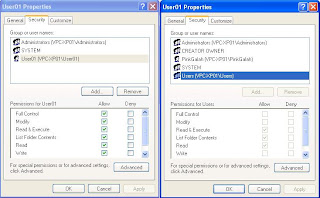 This clears shows the restored materials have fewer privileges than the original materials failing being a competent back up utility. This is a simulation of profile restoration.
Comodo Backup Version 2.2.127000.12
The user-interface is prettier than FBackup but it is also more confusing and functional lacking. With its user-interface, a user cannot workout how to get the program to remember the backup instructions so that one can reuse them again. However there are several ways this program that this program can do that, albeit not as intuitive as that for FBackup.
During the composition of the backup instruction using the wizard, you can use the Schedule definition to remember your instructions even if you do not want to do scheduled backup. You simply change the type to manual backup. Strange logic.
The other way is to export your backup instructions to a file which contains the command-line arguments corresponding to your instructions. With this file you can then use the /script command-line directive to supply the script file when launching the backup utility.
This utility has some slick facility allowing you to define the backup volume file format - such as including date, time etc. They call them macros and they are not available in FBackup. It also has facility for you to define the level of compression you want during backup.
Performance of this program is very good. However it suffers the same problem as in FBackup when it fails to reproduce precisely the ACLS as shown below:

Conclusion
These backup utilities are not really backup tools but specialized ZIP programs. It is not just because they are using ZIP format but because they left out the ACLS what they need to use to restore them
While NTBackup is available official in XP Pro and optionally in XP Home Edition, Microsoft has provided a cut-down version of this tool for Vista/Windows 7, called "Windows NT Backup - Restore Utility", so that user can restore from NTBackup volumes.
However, NTBackup has been known to run fine in Vista and in Windows 7 (and here). Since the 'installation' of NTBackup is so low impact, I will definitely give that a try. The big remaining question is: At what time in the future that Windows development will render our trusty friend not operable?
Let me describes the deficiency in Windows 7's "Backup and Restore" utility before I will describe my search result.
Microsoft has succeeded in taking a highly capable program called NTBackup and destroying it for the sake of some eye-candy screen. The Win7 backup is so slooooow that any ZIP program will beat it hands down. Not only that, the eye-candy stuff lacks any really useful progress information. It does not even bother to tell you how many files it has picked up, which file is processing, and the total size of the files being backup (until the whole thing is finished) or expected time to take, given that is a best-guess. Apart from some pretty looking screens, the user-interface is totally unintuitive and functionality lacking.
If you have not seen an industrial strength real back up utility, I suggest you fire up a copy of NTBackup in XP Pro or installed it in Home Edition.
One of the basic needs of a back up utility is to be able to add the back up information to what is already there like keeping revision so that you can go back several generations to restore the data.
Not only that a backup utility is as good as its restoration capability. It has to be able to restore the data accurately and precisely including restoring the original ACLS for the NTFS files and folders. Failure to do that can cause major problem and security risk. Imagine you are backing up the profile areas for a machine and has to do a disaster recovery only to discover that the resulting ACLS are all wrong!
A good backup utility also should ensure that the person running this must be a backup operator or one with the SeBackupPrivilege, to perform backup and SeRestorePrivilege, to perform restoration.
The other features commonly found in industrial strength backup utility is to be able to perform incremental backup so to reduce the backup volume. This is important when you are doing a daily backup.
Armed with these demands, I evaluated the following free backup programs: NTBackup, FBackup, and Comodo Backup.
Sadly only NTBackup managed to perform flawlessly managing to replicate the ACLS perfectly. Here is a screen shot of the source (left hand window) and restored folder's ACLS (right hand window):

FBackup4 Version 4.4 Build 207
This is a very simple to use free 'backup' utility. The good part of this one is its ability to manage several backup instructions as jobs in the program. It automatically increments the backup volume file name and the backup volume is in ZIP format. It is relatively fast.
However, it is a naive implementation of a backup utility. At best, it can only be classified as a ZIP program with a purpose-built user-interface.
Here is the screen shot of restoring the user's profile to an alternate location. Once again the left hand window shows the security settings of the original top level user profile folder and the right hand window shows that for the restored materials:

Comodo Backup Version 2.2.127000.12
The user-interface is prettier than FBackup but it is also more confusing and functional lacking. With its user-interface, a user cannot workout how to get the program to remember the backup instructions so that one can reuse them again. However there are several ways this program that this program can do that, albeit not as intuitive as that for FBackup.
During the composition of the backup instruction using the wizard, you can use the Schedule definition to remember your instructions even if you do not want to do scheduled backup. You simply change the type to manual backup. Strange logic.
The other way is to export your backup instructions to a file which contains the command-line arguments corresponding to your instructions. With this file you can then use the /script command-line directive to supply the script file when launching the backup utility.
This utility has some slick facility allowing you to define the backup volume file format - such as including date, time etc. They call them macros and they are not available in FBackup. It also has facility for you to define the level of compression you want during backup.
Performance of this program is very good. However it suffers the same problem as in FBackup when it fails to reproduce precisely the ACLS as shown below:

Conclusion
These backup utilities are not really backup tools but specialized ZIP programs. It is not just because they are using ZIP format but because they left out the ACLS what they need to use to restore them
While NTBackup is available official in XP Pro and optionally in XP Home Edition, Microsoft has provided a cut-down version of this tool for Vista/Windows 7, called "Windows NT Backup - Restore Utility", so that user can restore from NTBackup volumes.
However, NTBackup has been known to run fine in Vista and in Windows 7 (and here). Since the 'installation' of NTBackup is so low impact, I will definitely give that a try. The big remaining question is: At what time in the future that Windows development will render our trusty friend not operable?
Sunday, June 20, 2010
Virtual Machine software on Windows 7
Ever since Vista promoted that multiple level license pack - Home Edition, Professional/Business, Ultimate - Microsoft has been flagging certain programs "not supported" on cheaper edition.
This form of money grabbing exercise continues with Windows 7. Not contended with this, Microsoft actually turns up the confusion one more notch by introducing Windows Virtual PC as oppose to Virtual PC 2007 SP1.
Windows Virtual PC works fine with VM created in VPC2007. But one thing to remember, you cannot run Windows Virtual PC together with VPC2007sp1 on the same Windows.
When you install VPC200SP1 (just make sure Windows Virtual PC is uninstalled - go to 'Programs and Features' and then 'Turn Windows features on or off') on Windows 7 Home Edition, Windows will warn you that the program is not supported on this edition of Windows. Just ignore this as it works fine. It is Microsoft's way of tricking you to buy a more expensive edition. Read on for more virtual machines that do not practice this kind of scare tactic.
While running Windows Virtual PC, drag-drop from Host OS to Guest OS or vice versa does not seem to be working while VPC2007SP1 handles this operation without trouble. If you like the drag-drop feature, just use VPC2007SP1, which incidentally supports wider guest OS.
When running up the VPC2007SP1 console, it will display this lame warning message box:
 Just ignore this.
If you are concerned by this, check out this comprehensive review of other Virtual Machines available that are not concerned with which edition of your Windows 7 or Vista you are running on.
It is actually better to run non-Microsoft Virtual Machine because in this way you are guarantee a uninterrupted migration path to non-Microsoft Host OS machine. It is also interesting to note that VirtualBox can run 'XP Mode' VM.
After exploring these confusing situations, I have settled on using VM Player for serious stuff and to benefit from a much wider support of guest OS, leaving VPC2007SP1 to deal with my experimental VPC VM that I have accumulated.
This form of money grabbing exercise continues with Windows 7. Not contended with this, Microsoft actually turns up the confusion one more notch by introducing Windows Virtual PC as oppose to Virtual PC 2007 SP1.
Windows Virtual PC works fine with VM created in VPC2007. But one thing to remember, you cannot run Windows Virtual PC together with VPC2007sp1 on the same Windows.
When you install VPC200SP1 (just make sure Windows Virtual PC is uninstalled - go to 'Programs and Features' and then 'Turn Windows features on or off') on Windows 7 Home Edition, Windows will warn you that the program is not supported on this edition of Windows. Just ignore this as it works fine. It is Microsoft's way of tricking you to buy a more expensive edition. Read on for more virtual machines that do not practice this kind of scare tactic.
While running Windows Virtual PC, drag-drop from Host OS to Guest OS or vice versa does not seem to be working while VPC2007SP1 handles this operation without trouble. If you like the drag-drop feature, just use VPC2007SP1, which incidentally supports wider guest OS.
When running up the VPC2007SP1 console, it will display this lame warning message box:

If you are concerned by this, check out this comprehensive review of other Virtual Machines available that are not concerned with which edition of your Windows 7 or Vista you are running on.
It is actually better to run non-Microsoft Virtual Machine because in this way you are guarantee a uninterrupted migration path to non-Microsoft Host OS machine. It is also interesting to note that VirtualBox can run 'XP Mode' VM.
After exploring these confusing situations, I have settled on using VM Player for serious stuff and to benefit from a much wider support of guest OS, leaving VPC2007SP1 to deal with my experimental VPC VM that I have accumulated.
Friday, May 14, 2010
Firefox kills Windows Journal Writer in Fujitsu T4310 Windows 7 Tablet
I am rather shocked and annoyed to discover that Firefox 3.6.3 causes the Windows Journal Note Writer to crash in a Fujitsu T4310 Tablet PC running Windows 7. Initially I suspected it was caused by the Adobe Flash plug-in in Firefox but after many hours of painful cycles of recovery to factory settings that I have managed to nail it down to Firefox.
The machine is brand new and hence I can afford to reset it back to factory settings when things goes wrong.
For those new to Tablet technology, Journal is a key component that allows user to scribble electronic ink onto a document. It can be a blank page to start with or you can print an existing document to the Journal so that you can scribble notes on it or to highlight parts. Without it operating a Tablet is pretty ordinary.
The machine is installed from distributed image and then connects to the Internet by WiFi to retrieve all the Windows updates current to May 13, 2010. At each stage, the Windows Journal is fired up to ensure that it can render the blank page and that I can print from say Adobe Reader/IE8 to a Journal file. The Windows Journal still works even when IE8's Adobe Flash plug-in is installed. During my experiment, Microsoft Security Essentials or AntiVirus are not installed.
The installation of Firefox 3.6.3 proceeds without any trouble. I cannot launch Windows Journal or print from any program that once works to Journal Note Writer the moment Firefox is installed. Printing from Firefox causes the Journal to crash.
All the crashes cause Event ID 1000 and pin-pointed to mostly "C:\Windows\System32\msvcrt.dll" or occasionally to "C:\Program Files\Windows Journal\NBDoc.dll". In all events, the exception code is 0xC0000005, which means Access Violation and the fault offset for MSVCRT is the same. Here is a typical Event message:
Finally, after I've uninstalled Firefox, I launched a command prompt that "Run as administrator" and to apply the following steps to recover the Windows Journal:
In the "C:\Program Files\Windows Journal" directory
1) Run
Regsvr32 /u NBDoc.dll
Regsvr32 NBDoc.dll
2) Run
Journal /repairnotewriter
If you happen to run the last command in a CMD running as the log in user, a message box will inform you that it cannot find the specific file.
3) Then reboot.
When the machine is restarted, you can try to bring up Journal. It may still crash or it may bring up the Windows Journal Recovery dialog box as the last one you tried to print from Firefox did not go to completion. Do not choose to recover and this should bring up the blank page. You can then close the Journal Writer to complete the recover process.
You may also choose to launch the Journal Writer with an existing JNT file when launching by itself fails.
After the Windows Journal is restored (with Firefox uninstalled of course) you can print from IE or any programs.
I have been a long time Tablet user and is still using my P1510 running XP with Firefox and I have never seen this bizarre interference.
If anyone has any idea what is exactly happening in the background causing them to be hostile to each other or similar bizarre interference, I would like to hear from you. If you have a way to fix this, it is even more welcoming.
The machine is brand new and hence I can afford to reset it back to factory settings when things goes wrong.
For those new to Tablet technology, Journal is a key component that allows user to scribble electronic ink onto a document. It can be a blank page to start with or you can print an existing document to the Journal so that you can scribble notes on it or to highlight parts. Without it operating a Tablet is pretty ordinary.
The machine is installed from distributed image and then connects to the Internet by WiFi to retrieve all the Windows updates current to May 13, 2010. At each stage, the Windows Journal is fired up to ensure that it can render the blank page and that I can print from say Adobe Reader/IE8 to a Journal file. The Windows Journal still works even when IE8's Adobe Flash plug-in is installed. During my experiment, Microsoft Security Essentials or AntiVirus are not installed.
The installation of Firefox 3.6.3 proceeds without any trouble. I cannot launch Windows Journal or print from any program that once works to Journal Note Writer the moment Firefox is installed. Printing from Firefox causes the Journal to crash.
All the crashes cause Event ID 1000 and pin-pointed to mostly "C:\Windows\System32\msvcrt.dll" or occasionally to "C:\Program Files\Windows Journal\NBDoc.dll". In all events, the exception code is 0xC0000005, which means Access Violation and the fault offset for MSVCRT is the same. Here is a typical Event message:
Log Name:      Application
Source:        Application Error
Date:          5/13/2010 11:55:08 AM
Event ID:      1000
Task Category: (100)
Level:         Error
Keywords:      Classic
User:          N/A
Computer:      ABCD-PC7
Description:
Faulting application name: journal.exe, version: 6.1.7600.16385, time stamp: 0x4a5bc80a
Faulting module name: msvcrt.dll, version: 7.0.7600.16385, time stamp: 0x4a5bda6f
Exception code: 0xc0000005
Fault offset: 0x00009c7f
Faulting process id: 0x14d4
Faulting application start time: 0x01caf25012163ca9
Faulting application path: C:\Program Files\windows journal\journal.exe
Faulting module path: C:\windows\system32\msvcrt.dll
Finally, after I've uninstalled Firefox, I launched a command prompt that "Run as administrator" and to apply the following steps to recover the Windows Journal:
In the "C:\Program Files\Windows Journal" directory
1) Run
Regsvr32 /u NBDoc.dll
Regsvr32 NBDoc.dll
2) Run
Journal /repairnotewriter
If you happen to run the last command in a CMD running as the log in user, a message box will inform you that it cannot find the specific file.
3) Then reboot.
When the machine is restarted, you can try to bring up Journal. It may still crash or it may bring up the Windows Journal Recovery dialog box as the last one you tried to print from Firefox did not go to completion. Do not choose to recover and this should bring up the blank page. You can then close the Journal Writer to complete the recover process.
You may also choose to launch the Journal Writer with an existing JNT file when launching by itself fails.
After the Windows Journal is restored (with Firefox uninstalled of course) you can print from IE or any programs.
I have been a long time Tablet user and is still using my P1510 running XP with Firefox and I have never seen this bizarre interference.
If anyone has any idea what is exactly happening in the background causing them to be hostile to each other or similar bizarre interference, I would like to hear from you. If you have a way to fix this, it is even more welcoming.
Tuesday, May 11, 2010
A review of two Windows 7 Tablet PCs with touch support
I was looking to buy a Windows 7 tablet PC that was more than a touch sensitive notebook. I am not a novice to Tablet as I am still using a T1510 when it was first release several years ago. Any candidate must be able to write like a tablet PC as the primary requirement, which means you can input without the use of the keyboard by means of the TIP (Tablet Input Panel) and touch support was a secondary requirement.
I narrow down to two: Acer Multi-Touch and Fijitsu T4310L both running Windows 7 Home Edition. The processor specification was of secondary concern to me. The functioning as a tablet was more important to me.
Because of the price difference and the weight, the Acer was the first that attracted my attention. In all respect this machine had every tablet tools and support - TIP, Journal Writer, Snipping tool and sticky note, except one thing.
This machine does not come with a pen and rely solely on touch operation which was currently in vogue. This decision by Acer defied the natural human instincts. No human I know of writes with a finger otherwise Quill was never discovered. But Acer, in search of being vogue failed to deal with this probably. Most likely buyers' ignorance and misconception of a touch computer and a tablet. I placed the blame on the level of competence on the sales people.
A quick test of writing my name was a real struggle with the TIP and I challenged anyone to write more complicated text such as any Chinese characters on it. Even the sales person had a real struggle. Sure you could flick through image files with ease with a finger but you could not flick out a sentence or even some basic words.
Seeing several people struggling with it, I declared that Acer was not only an unsuitable Tablet PC but also bordering on not being a Tablet PC either. It is basically a touch sensitive notebook with all the Tablet tools, that no one can basically use. Its bias towards touch robbed its market share. It was more than a touch (pardon the punt) of disappointment.
I would definitely not recommend this to anyone as a Tablet PC. If your sole purpose was to get that flicking and touching actions, then you could do a lot better with a purely touch sensitive notebook, rather paying for an imitation Tablet PC.
With this shocking disappointment, I moved over to a Fijitsu T4310L with Windows 7 Home edition. This machine came with a special pen and also reacted to touch, like flicking. Writing on the TIP with that pen instantly showed the difference between this and the Acer. It was like comparing a Harley Davidson with a bicycle.
It was pure joy to write with the pen on this machine, even to a novice by-stander. Coupled with the smart recognizer, which was also available to Acer but incapable to exploit it properly, the degree of accuracy was several order of magnitude of improvement over my T1510. The special pen had programmable buttons on it as well as an eraser at the top of it.
The only disappointment was that it used a special pen that was expensive to replace. Without it, one had to resort to using the finger and this brought it back to the level of incompetency of the Acer.
With respect to some of messages from Microsoft on the combination of hand writing recognizers one could have in a Home Edition, I was pleasantly surprised to see the presence of Traditional and Simplified Chinese recognizers in an English Windows 7 Home Edition.
I was so disappointed with the Acer that I did not bother to try to discover this support. The other reason was that I could not use the finger to touch that tiny down arrow to drop down the language options in the TIP. Not such frustration on the T4310.
Hence I could not be certain if the policy reported had been repealed quietly for the sake of good common sense and now an English Home Edition could have any other language recognizers one needed, just like previous editions of Windows. But I could be certain that it was available in my T4310 running Windows 7 Home Edition.
T4310 was a clear winner, even though it was dearer. What's the use buying a cheaper Tablet PC imitation.
I narrow down to two: Acer Multi-Touch and Fijitsu T4310L both running Windows 7 Home Edition. The processor specification was of secondary concern to me. The functioning as a tablet was more important to me.
Because of the price difference and the weight, the Acer was the first that attracted my attention. In all respect this machine had every tablet tools and support - TIP, Journal Writer, Snipping tool and sticky note, except one thing.
This machine does not come with a pen and rely solely on touch operation which was currently in vogue. This decision by Acer defied the natural human instincts. No human I know of writes with a finger otherwise Quill was never discovered. But Acer, in search of being vogue failed to deal with this probably. Most likely buyers' ignorance and misconception of a touch computer and a tablet. I placed the blame on the level of competence on the sales people.
A quick test of writing my name was a real struggle with the TIP and I challenged anyone to write more complicated text such as any Chinese characters on it. Even the sales person had a real struggle. Sure you could flick through image files with ease with a finger but you could not flick out a sentence or even some basic words.
Seeing several people struggling with it, I declared that Acer was not only an unsuitable Tablet PC but also bordering on not being a Tablet PC either. It is basically a touch sensitive notebook with all the Tablet tools, that no one can basically use. Its bias towards touch robbed its market share. It was more than a touch (pardon the punt) of disappointment.
I would definitely not recommend this to anyone as a Tablet PC. If your sole purpose was to get that flicking and touching actions, then you could do a lot better with a purely touch sensitive notebook, rather paying for an imitation Tablet PC.
With this shocking disappointment, I moved over to a Fijitsu T4310L with Windows 7 Home edition. This machine came with a special pen and also reacted to touch, like flicking. Writing on the TIP with that pen instantly showed the difference between this and the Acer. It was like comparing a Harley Davidson with a bicycle.
It was pure joy to write with the pen on this machine, even to a novice by-stander. Coupled with the smart recognizer, which was also available to Acer but incapable to exploit it properly, the degree of accuracy was several order of magnitude of improvement over my T1510. The special pen had programmable buttons on it as well as an eraser at the top of it.
The only disappointment was that it used a special pen that was expensive to replace. Without it, one had to resort to using the finger and this brought it back to the level of incompetency of the Acer.
With respect to some of messages from Microsoft on the combination of hand writing recognizers one could have in a Home Edition, I was pleasantly surprised to see the presence of Traditional and Simplified Chinese recognizers in an English Windows 7 Home Edition.
I was so disappointed with the Acer that I did not bother to try to discover this support. The other reason was that I could not use the finger to touch that tiny down arrow to drop down the language options in the TIP. Not such frustration on the T4310.
Hence I could not be certain if the policy reported had been repealed quietly for the sake of good common sense and now an English Home Edition could have any other language recognizers one needed, just like previous editions of Windows. But I could be certain that it was available in my T4310 running Windows 7 Home Edition.
T4310 was a clear winner, even though it was dearer. What's the use buying a cheaper Tablet PC imitation.
Monday, May 10, 2010
Supporting Chinese hand writing in English Windows 7 without Ultimate or Enterprise Edition
Microsoft has a funny definition of the word 'upgrade'. If you are currently using English XP or Vista you can have whatever Chinese hand writing recognizers with you without paying Microsoft extra. But 'upgrading' to Windows 7, you get a downgrading of functionality in this respect unless you pay dearly.
I am not going to sit idle allowing Microsoft to charging me ransom for a functionality that is available previously and in an operating system that supports multi-lango from the ground up. This Microsoft's decision certainly deters me from upgrading my XP Tablet to one running Windows 7. I certainly will recommend any other XP or Vista Tablet users to do likewise.
So if you are one of those victims, here are relieves from being held hostage. There are two ways to do:
1) Use Pen Power (小蒙恬)
This comes with a writing pad and a suite of software to deal with Chinese characters recognition.
2) Use NJStar Pen.
This is a software only solution using your mouse as the writing instrument while the screen is the stroke painter or writing pad. Once a character is recognized, it sends the character to the application currently with the focus.
The first one is naturally more powerful and gives a more natural writing experience but if you have a tablet, NJStar Pen provides an writing experience as natural as that of Pen Power, without the need to have the writing pad tethered to your machine.
NJStar Pen is supposedly free and even if one has to purchase that, it is a lot cheaper than paying for an Ultimate edition just to write Chinese characters on irregular basis.
I am not going to sit idle allowing Microsoft to charging me ransom for a functionality that is available previously and in an operating system that supports multi-lango from the ground up. This Microsoft's decision certainly deters me from upgrading my XP Tablet to one running Windows 7. I certainly will recommend any other XP or Vista Tablet users to do likewise.
So if you are one of those victims, here are relieves from being held hostage. There are two ways to do:
1) Use Pen Power (小蒙恬)
This comes with a writing pad and a suite of software to deal with Chinese characters recognition.
2) Use NJStar Pen.
This is a software only solution using your mouse as the writing instrument while the screen is the stroke painter or writing pad. Once a character is recognized, it sends the character to the application currently with the focus.
The first one is naturally more powerful and gives a more natural writing experience but if you have a tablet, NJStar Pen provides an writing experience as natural as that of Pen Power, without the need to have the writing pad tethered to your machine.
NJStar Pen is supposedly free and even if one has to purchase that, it is a lot cheaper than paying for an Ultimate edition just to write Chinese characters on irregular basis.
Saturday, May 8, 2010
Microsoft is not encouraging Multi-Lango Tablet PC in Windows 7
I am a user of XP Tablet PC and is looking for a replacement. Over the last several years, I have monitored the feature set they built into each OS to support Tablet operation. One of the main demands, and I believe plenty others, are that it must have recognizers for other languages. For example, if the OS locale is English, it must have Asia hand writing recognizers.
People using XP Tablet PC and Vista, takes this for granted even as it is available for base model of Vista on a tablet PC.
So when the Windows 7 comes along with the much touted expanded International Support when I tested a Tablet PC running English Windows 7 Home Premium naturally I expect that I could just add the Chinese recognizer and be able to interpose English writings with Chinese characters. Sadly, Microsoft take 2 steps forward and 4 steps back encouraged by pure greed to deny their customers this supports from the past.
While all the languages are available via keyboard inputs for all versions of Windows 7, hand writing recognizers for different languages are only available at the really top end of the spectrum:
"New handwriting recognizers enable more people around the world to take advantage of handwriting recognition." Not likely with that kind of greedy and backward policy.
People using XP Tablet PC and Vista, takes this for granted even as it is available for base model of Vista on a tablet PC.
So when the Windows 7 comes along with the much touted expanded International Support when I tested a Tablet PC running English Windows 7 Home Premium naturally I expect that I could just add the Chinese recognizer and be able to interpose English writings with Chinese characters. Sadly, Microsoft take 2 steps forward and 4 steps back encouraged by pure greed to deny their customers this supports from the past.
While all the languages are available via keyboard inputs for all versions of Windows 7, hand writing recognizers for different languages are only available at the really top end of the spectrum:
Vista Home Premium customers could do handwriting recognition in up to 12 languages. In Windows 7 they will only get recognition for whatever Language Packs are installed (normally one language) and have no options for additional languages other than upgrading to Enterprise or Ultimate.With this kind of pricing policy Microsoft sends a clear message that she is more interested in money grabbing than to provide a truly affordable multi-lango tablet market. No wonder the tablet market is dwindling aided by Microsoft's greedy policy. Its downfall is not so much caused by technical issues but rather scuttled by its creator through greed.
Home Premium customers will get the handwriting recognizer that corresponds to the language of their OS; i.e., a Swedish customer running Swedish Windows 7 will be able to use the Swedish handwriting recognizer. Enterprise and Ultimate customers can deploy additional recognizers by downloading the desired Language Packs and enabling the respective keyboards. The English recognizer is available to all Tablet PC customers on all SKUs.
New handwriting recognizers enable more people around the world to take advantage of handwriting recognition. If you have some type of pen input device, you have access to handwriting input. In fact, you can use your mouse as a rudimentary input device.
"New handwriting recognizers enable more people around the world to take advantage of handwriting recognition." Not likely with that kind of greedy and backward policy.
Thursday, April 15, 2010
Instructions to set up Limited User Account in Windows 7
This contains an excellent step-by-step instructions on how to:
This sentiment is perfectly correct and explains precisely why so many people dislike Vista and I suspect grudgingly by now Windows 7:
I think Vista and Windows 7 are on the right track. I would love to see the file and registry virtualization removed to force developers to be more careful and not to be misled.
- Disable the built-in administrator account and why it is best to leave it disabled.
- Set up an account purely to do system administrative work, such as installation
- Set up a limited user account for normal usage.
This sentiment is perfectly correct and explains precisely why so many people dislike Vista and I suspect grudgingly by now Windows 7:
But even with the more modern Windows NT systems, Windows 2000, and Windows XP, it was so painful to really get your work done as a non-administrative user that most people simply gave up and ran with an Admin account. This was almost entirely due to poor habits by software developers: they themselves ran as Admins, and they simply wrote sloppy code that assumed everybody was one too.I have been operating XP in LUA for years doing all sorts of development without difficulties. Initially yes, there is a learning curve but that actually is very beneficial because it teaches you the security model and let you feel the presence of the security envelop. You also experience the security side of a particular technology. In the end producing a more secure program.
I think Vista and Windows 7 are on the right track. I would love to see the file and registry virtualization removed to force developers to be more careful and not to be misled.
Subscribe to:
Posts (Atom)
