Further to my discovery of problem in Gpg4Win when the "Language for non-Unicode program" is not set to English, I decided to test it in Traditional Chinese Windows with "Language for non-Unicode program" set to same as the Unicode language (TChinese HK SAR) and to English US.
Sadly Gpg4Win will not allow me to enter passphrase when generating my key:
The captured screen shot did not show the mouse carot but it was actually inside the Passphrase edit box and no matter what I typed, nothing appearing.
The strange thing is that. I could enter my name and e-mail address, albeit very poor focusing handling, but only in the passphrase entry dialog did the program misbehave. This kind of misbehavior in part but not in other is common in this program.
Not deterred by this, my next test was to import a key that was generated in an English Windows XP. The import process worked fine.
But once again the Windows Explorer plug-in failed when I used the context menu to encrypt a small text file with the same misbehavior reported previously.
The next test is to use the File Manager (a rather clunky and clumsy user-interface. They should simply just make a Windows API call to invoke the familiar UI) from the GPA (GNU Privacy Assistance) to see if I could encrypt and decrypt the text file the loooooong way that could not be done via the Explorer plug-in.
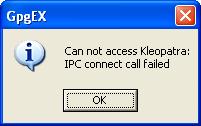
Once again, like other features in Gpg4Win, parts work and other parts fail. The annoying things are those operations that fail aren't some exotic rarely used ones. I could encrypt a text file but when I tried to decrypt it, I was met with this familiar dialog box:
The content showed the correct armor text. To prove that the file was correctly encrypted, I took this file to an English Windows and it decrypted it fine. This clear shows another bug in Gpg4Win.
Conclusion:
Gpg4Win 2.0.4 does not work in a non-English Windows or English Windows with non-English language for "Language for non-Unicode program" settings.
A site devoted to discussing techniques that promote quality and ethical practices in software development.
Tuesday, August 24, 2010
Sunday, August 15, 2010
GPG3Win 2.0.4 Windows Explorer Context menu still fails to work
This is my pet project to see how long it takes Gpg4Win to produce a Windows Explorer context menu that is capable to encrypt and decrypt files.
My test environment is XP Pro SP3 (English Windows) with HK SAR as the language setting for non-Unicode Programs. Gpg4Win's explorer context menu fails to encrypt and decrypt a file producing the following familiar dreaded message box:
To get this feature working one has to change the "Language for non-Unicode program" is set to English. This is an unnecessary demand clearly indicating a lack of Internationalization Programming prowess. It presents great inconvenience to non-English speaking Windows users. Sad to see this bug still lingering on for so long.
It is another case of using 'It-works-here' development methodology.
My test environment is XP Pro SP3 (English Windows) with HK SAR as the language setting for non-Unicode Programs. Gpg4Win's explorer context menu fails to encrypt and decrypt a file producing the following familiar dreaded message box:
To get this feature working one has to change the "Language for non-Unicode program" is set to English. This is an unnecessary demand clearly indicating a lack of Internationalization Programming prowess. It presents great inconvenience to non-English speaking Windows users. Sad to see this bug still lingering on for so long.
It is another case of using 'It-works-here' development methodology.
Labels:
gpg,
Internationalization
Tuesday, August 3, 2010
Some people just writing rubbish on the Internet
Consider this totally inaccurate and ignorant statement by Jason Hiner on ZdNet:
Is he joking? I was using one and listed on Fujitsu's product site. There are plenty of Windows 7 touchy type of touch-screen only device too if he cares to investigate. All of them can do that silly gesture to open and flick. The T4310 can do both - touch sensitive as well as using stylus to write in ink - something iPad can't do.
Just because Apple brought out a touch-sensitive device, just like those in use in check out counters, so may so called tech journalists are totally confused.
It is like saying a vehicle is not a car if it does not look like a Mini while accusing Toyota and Land Rover has yet to produce a car!
No Windows 7 tablets have hit the market, or even been officially announced.Jason has either lived in the wilderness for the last few years or so ignorant to make such a statement. No Windows 7 tablet?
Is he joking? I was using one and listed on Fujitsu's product site. There are plenty of Windows 7 touchy type of touch-screen only device too if he cares to investigate. All of them can do that silly gesture to open and flick. The T4310 can do both - touch sensitive as well as using stylus to write in ink - something iPad can't do.
Just because Apple brought out a touch-sensitive device, just like those in use in check out counters, so may so called tech journalists are totally confused.
It is like saying a vehicle is not a car if it does not look like a Mini while accusing Toyota and Land Rover has yet to produce a car!
Labels:
Tablet PC
Monday, August 2, 2010
Important to set up a subversion repository correctly
To use Subversion effectively, one needs to sit down and plan the organization of the repository layout. "Version Control with Subversion" book page 16, recommends:
Then one day you decide to start using tags to record interesting events. Where do you now put it? Let's create a directory called Tags and put it there, like this:
Now you may think this fixes the problem. Not quite. If some one decides to check out the trunk, this is what you will end up with:
Now you do not only get the files for the trunk but also files associated with every tags you have in the repository. In this demo, I only have one tag.
While it is not a dead loss, you can still fix this situation. First get everybody to check in everything first.
Then create three separate directories in the repository, 2 are of immediate need, as Trunk, Tags and Branches directly below the root. Staying with the recommended names and structures benefit everybody and avoid misunderstanding.
Select all the trunk directories, excluding Branches, Trunk, or Tags folders, and move them into the Trunk sub-directory.
Check the Trunk out to a different directory on your local drive. it is best not to use your old copy anymore. Then tag that immediately so that you know this important event in correcting the repository directory structure. Of course you store the tag in the Tags sub-directory.
These steps are totally unnecessary if it is done immediate after the creation of the repository.
While Subversion's flexibility allows you to lay out your repository in any way that you choose, we recommend that you create a trunk directory to hold the “main line” of development, a branches directory to contain branch copies, and a tags directory to contain tag copies. For example:Failure to adhere to this recommendation can bring lots of grief later on. Often when you start off a project, you may not anticipate that you may need tags or branches and hence you start importing file directly into the repository at the root. Like this:
$ svn list file:///var/svn/repos
/trunk
/branches
/tags
Then one day you decide to start using tags to record interesting events. Where do you now put it? Let's create a directory called Tags and put it there, like this:
Now you may think this fixes the problem. Not quite. If some one decides to check out the trunk, this is what you will end up with:
Now you do not only get the files for the trunk but also files associated with every tags you have in the repository. In this demo, I only have one tag.
While it is not a dead loss, you can still fix this situation. First get everybody to check in everything first.
Then create three separate directories in the repository, 2 are of immediate need, as Trunk, Tags and Branches directly below the root. Staying with the recommended names and structures benefit everybody and avoid misunderstanding.
Select all the trunk directories, excluding Branches, Trunk, or Tags folders, and move them into the Trunk sub-directory.
Check the Trunk out to a different directory on your local drive. it is best not to use your old copy anymore. Then tag that immediately so that you know this important event in correcting the repository directory structure. Of course you store the tag in the Tags sub-directory.
These steps are totally unnecessary if it is done immediate after the creation of the repository.
Labels:
Subversion
Friday, July 30, 2010
Why no portable Office from Microsoft? OpenOffice is portable.
When .Net was introduced to the world, one of the features touted was an XCopy Deployment mode. That is one can simply copy a software suite from one location (a remote server) and drop it onto your local drive and it just works. None of these heavy weight installation program requiring administrative rights. In .Net 2, Microsoft further enhanced this with the ClickOnce deployment.
Sadly, there is still not one product from Microsoft that utilizes this XCopy deployment - this is a classic case of "Do as I preach and Not as I do". There are plenty of products from other parties that have achieved this 'XCopy Deployment' mode and they fall into a class called the Portable Applications. Notice the complete absence of any Microsoft's contribution in this area.
Just about every competitor to Microsoft has portable version: Browser - Portable Firefox, MailClient/Outlook - Portable Thunderbird, Office - Porftable OpenOffice, Messenger - several portable ones, such as Portable Pidgin, the list goes on. Even poor old Microsoft's WordPad has been made portable and enhanced but not from Microsoft.
The Portable OpenOffice is so convenient not having to install the 500lb Gorilla called Microsoft Office just to write some documents. So why Microsoft has tried to preach the features of XCopy/ClickOnce while itself refrain from using them?
Sure, the portable version does not support the Object Linking And Embedding or OLE Automation. In most cases, people do not need them. Besides there are portable applications that when installed into the hard drive can provide that kind of features. I am sure Microsoft can figure that out.
It is not a technical impediment. I think the main reason Microsoft has not dared to venture into this area is MONEY. How can you force someone to activate when it is a portable application? If Microsoft cannot force people to activate their 'portable' application, it can't force people to pay them. The only way Microsoft's money tree continues to thrive is to force the users to cement the applications deeply rooted into the machine's hard drive. To hell with users' convenience.
Back to Portable OpenOffice's (version 3.2.0) word processing module. I am extremely impressed with its capability and pound for pound matching the expensive MS Office. Sure no eye-candy of MS Office 2007 but who cares. Sure there are quirky stuff in MS Office that OpenOffice can't do but are they in the frequently used features demanded by majority users? The best part is that I do not have to install it. If I am working on a Virtual Machine and needing something to write with more capability than Wordpad, I simply operate either from a USB drive or drag the suite onto the Virtual hard drive. Not need to go through the pain of installation followed by dreaded activation which disturbs the machine's environment. Often activation will fail because it has already been activated previously!
Previously I have been rather skeptical of the performance and reliability of OpenOffice but after having spend days on it writing lengthy document recording my experiment, I am mightily impressed by it. It is free and it does not bother me with Activation. That's how software should be deployed.
If it can function with the Tablet PC's TIP (Tablet Input Panel), I will install it into my Tablet PC and ditch the 500lb gorilla.
Sadly, there is still not one product from Microsoft that utilizes this XCopy deployment - this is a classic case of "Do as I preach and Not as I do". There are plenty of products from other parties that have achieved this 'XCopy Deployment' mode and they fall into a class called the Portable Applications. Notice the complete absence of any Microsoft's contribution in this area.
Just about every competitor to Microsoft has portable version: Browser - Portable Firefox, MailClient/Outlook - Portable Thunderbird, Office - Porftable OpenOffice, Messenger - several portable ones, such as Portable Pidgin, the list goes on. Even poor old Microsoft's WordPad has been made portable and enhanced but not from Microsoft.
The Portable OpenOffice is so convenient not having to install the 500lb Gorilla called Microsoft Office just to write some documents. So why Microsoft has tried to preach the features of XCopy/ClickOnce while itself refrain from using them?
Sure, the portable version does not support the Object Linking And Embedding or OLE Automation. In most cases, people do not need them. Besides there are portable applications that when installed into the hard drive can provide that kind of features. I am sure Microsoft can figure that out.
It is not a technical impediment. I think the main reason Microsoft has not dared to venture into this area is MONEY. How can you force someone to activate when it is a portable application? If Microsoft cannot force people to activate their 'portable' application, it can't force people to pay them. The only way Microsoft's money tree continues to thrive is to force the users to cement the applications deeply rooted into the machine's hard drive. To hell with users' convenience.
Back to Portable OpenOffice's (version 3.2.0) word processing module. I am extremely impressed with its capability and pound for pound matching the expensive MS Office. Sure no eye-candy of MS Office 2007 but who cares. Sure there are quirky stuff in MS Office that OpenOffice can't do but are they in the frequently used features demanded by majority users? The best part is that I do not have to install it. If I am working on a Virtual Machine and needing something to write with more capability than Wordpad, I simply operate either from a USB drive or drag the suite onto the Virtual hard drive. Not need to go through the pain of installation followed by dreaded activation which disturbs the machine's environment. Often activation will fail because it has already been activated previously!
Previously I have been rather skeptical of the performance and reliability of OpenOffice but after having spend days on it writing lengthy document recording my experiment, I am mightily impressed by it. It is free and it does not bother me with Activation. That's how software should be deployed.
If it can function with the Tablet PC's TIP (Tablet Input Panel), I will install it into my Tablet PC and ditch the 500lb gorilla.
Labels:
.Net,
Portable Applications
Monday, July 26, 2010
One would expect an online bank to know QIF file format? Don't count on www.ingdirect.com.au
INGDirect has been caught previously for corrupting the download transaction data, now it has even failed to encode the download transaction data in correct QIF format.
Consider the following excerpt of the downloaded transaction in QIF format:
Sad to find an online bank does not know basic stuff.
Consider the following excerpt of the downloaded transaction in QIF format:
!Type:BankThe bit in red should not be there. I have to run a filter to get rid of those offending records before it can be imported properly.
D30/06/2010
PDeposit - Interest Credit
T
T10.88
T42345.94
^
D27/06/2010
PDeposit - Deposit from linked bank account
T
T1000.00
T43345.94
^
Sad to find an online bank does not know basic stuff.
Thursday, July 8, 2010
No need to use VPC2007 or Windows Virtual PC in Windows 7
If you are using a home edition of Vista or Windows 7 and is discouraged by the money grabbing exercise of Microsoft trying to frighten you into buying a Pro or higher edition just so that you can run your VPC Virtual Machine in peace don't worry.
There is a better & free way to run your VPC VM by following these steps:
1) Get a copy of free VMPlayer 3.0 and install it into your machine. The installation does not contain any frighten languages like installing VPC2007SP1 in Vista or Windows 7.
2) Then download the Converter and install it. This converter can convert your VPC VM to VMPlayer format without loss of data. You don't even need to have VPC installed in your machine to convert, just the VMC & VHD files will do. After that you can ditch Microsoft's VPC for good.
This converter is more powerful than converting VPC VM to that on VMPlayer, it can convert a physical machine to a virtual machine, something even Microsoft's tool can't do.
I have just converted one of my VPC VM in my Windows 7 Home Edition to VMPlayer and thoroughly enjoying it. I don't know why anyone would want to bother with Microsoft's VPC which is hostile to Home Edition owners.
There is a better & free way to run your VPC VM by following these steps:
1) Get a copy of free VMPlayer 3.0 and install it into your machine. The installation does not contain any frighten languages like installing VPC2007SP1 in Vista or Windows 7.
2) Then download the Converter and install it. This converter can convert your VPC VM to VMPlayer format without loss of data. You don't even need to have VPC installed in your machine to convert, just the VMC & VHD files will do. After that you can ditch Microsoft's VPC for good.
This converter is more powerful than converting VPC VM to that on VMPlayer, it can convert a physical machine to a virtual machine, something even Microsoft's tool can't do.
I have just converted one of my VPC VM in my Windows 7 Home Edition to VMPlayer and thoroughly enjoying it. I don't know why anyone would want to bother with Microsoft's VPC which is hostile to Home Edition owners.
Labels:
Virtualization,
VMPlayer,
Windows 7
Subscribe to:
Posts (Atom)