The pros and cons of KeePass V2 and V1 have been discussed previously.
Finally I have decided to switch allegiance to V1. What sways me over is the problem in V2 needing .Net framework 2. While progressively more and more machines are running Windows Vista or Windows 7, but there are still plenty of WinXP machines out there.
In fact, I was using one that does not have .Net Framework 2 and I was going to use to configure my modem/router. In that situation, I could not use my KeePass v2 database and I did not feel like installing .Net Framework 2 just to run this program. It is kind of defeating the portability advantage of KeePass.
With XP, you cannot count on it having a .Net Framework 2 on it. Without it, your KeePass V2 database is as good as corrupted.
To avoid being left out in the cold, I exported the KeePass v2's kdbx file format to KeePass V1 database format and use the V1.17 instead.
Performance-wide, it starts a lot faster. Until the day when .Net Framework is so widespread that it is not a issue or KeePass organization stops maintaining V1, I will then upgrade to V2.
Friday, July 2, 2010


Wednesday, June 30, 2010
No joy being (mis)classified as a bogon!
About a week ago, I tried to access http://www.translink.com.au, the integrated public transport for South East Queensland, and my browser timed me out unable to reach the site and since then I cannot access that site. Over this period and preceding that, I have not changed any router settings.
A tractrt brought me this typical result:
Initially I thought the site might have been down but asking several friends to test reach this site told me the site was up and running. While some using the same ISP as mine, TPG, met with the same fate. A search on the Internet resulted in a thread in a broadband forum discussing this very issue for users on TPG, my ISP, meeting the same fate.
My fate apparently is the result of me, by virtue of my IP address, being a bogon. It is no joy because essentially I cannot do anything as I do not control the IP address allocation. Furthermore, when things like this happening, there is no one-stop shop where you can go to get help and no one authority having the power to arbitrate. The ISP giving me the IP address is not really responsible for my fate; I guess in some way they are responsible for allocating a bogon IP to me. The destination party may be slow to the bogon's classification update announcement to correct the filtering problem resulting my mis-classification. That party may not even understand or aware that they are doing bogon filter using outdated data. Have you ever tried to discuss this kind of technical details on a site's feedback page, if one exists?
This site is of great importance to me as I routinely perform legitimate e-commerce transactions on it to top up my transport stored value smart card. Failure to access this will mean that I have to top up by queuing up at top up stations denying me the convenience e-commerce brings.
Thankfully at the moment, I have two ways to reach this site beating the alleged bogon classification. One is to use a proxy server like http://freeproxyserver.net. The other technique is to use a Tor Browser, which is my preferred way to access this site.
Just to prove that there is nothing wrong with my internet connection and router settings, here is a screen shot showing the successful connection to Translink, showing on the left using Tor Browser, and the failure screen via direct connection using my ISP allocated IP address, shown on the right. The two browsers are running simultaneously.

When using IE8, the message return is that it cannot display the page like this:

Perhaps there is another explanation other than me being a bogon! Checking my IP address against a list of Blacklist Servers using whatismyipaddress.com tells me that I am not blacklisted. So is the reason?
At the moment I am in limbo with two lifelines at the mercy of the Internet magic! If you are contemplating of implementing bogon filtering, be prepared to do frequent update as IP ranges go in and out of the bogon range. Failure will cause unwittingly innocent victims, like me, great problem. Think hard before you use bogon filter.
A tractrt brought me this typical result:
Tracing route to www.translink.com.au [202.58.101.51]
over a maximum of 30 hops:
1 2 ms 1 ms 1 ms 192-168-1-1.tpgi.com.au [192.168.1.1]
2 24 ms 24 ms 24 ms 10.20.21.36
3 24 ms 24 ms 24 ms 202-7-165-1.tpgi.com.au [202.7.165.1]
4 25 ms 24 ms 24 ms bri-sot-wic-crt2-po1.tpgi.com.au [202.7.171.41]
5 41 ms 42 ms 41 ms syd-sot-ken-crt1-TG-7-0-0.tpgi.com.au [202.7.171.125]
6 42 ms 41 ms 41 ms 202-7-162-246.tpgi.com.au [202.7.162.246]
7 59 ms 59 ms 59 ms 149.59.194.203.static.comindico.com.au [203.194.59.149]
8 59 ms 59 ms 59 ms 149.59.194.203.static.comindico.com.au [203.194.59.149]
9 * * * Request timed out.
10 * * * Request timed out.
11 * * * Request timed out.
12 * * * Request timed out.
13 * * * Request timed out.
14 * * * Request timed out.
15 * * * Request timed out.
16 * * * Request timed out.
17 * * * Request timed out.
18 * * * Request timed out.
19 * * * Request timed out.
20 * * * Request timed out.
21 * * * Request timed out.
22 * * * Request timed out.
23 * * * Request timed out.
24 * * * Request timed out.
25 * * * Request timed out.
26 * * * Request timed out.
27 * * * Request timed out.
28 * * * Request timed out.
29 * * * Request timed out.
30 * * * Request timed out.
Trace complete.
Initially I thought the site might have been down but asking several friends to test reach this site told me the site was up and running. While some using the same ISP as mine, TPG, met with the same fate. A search on the Internet resulted in a thread in a broadband forum discussing this very issue for users on TPG, my ISP, meeting the same fate.
My fate apparently is the result of me, by virtue of my IP address, being a bogon. It is no joy because essentially I cannot do anything as I do not control the IP address allocation. Furthermore, when things like this happening, there is no one-stop shop where you can go to get help and no one authority having the power to arbitrate. The ISP giving me the IP address is not really responsible for my fate; I guess in some way they are responsible for allocating a bogon IP to me. The destination party may be slow to the bogon's classification update announcement to correct the filtering problem resulting my mis-classification. That party may not even understand or aware that they are doing bogon filter using outdated data. Have you ever tried to discuss this kind of technical details on a site's feedback page, if one exists?
This site is of great importance to me as I routinely perform legitimate e-commerce transactions on it to top up my transport stored value smart card. Failure to access this will mean that I have to top up by queuing up at top up stations denying me the convenience e-commerce brings.
Thankfully at the moment, I have two ways to reach this site beating the alleged bogon classification. One is to use a proxy server like http://freeproxyserver.net. The other technique is to use a Tor Browser, which is my preferred way to access this site.
Just to prove that there is nothing wrong with my internet connection and router settings, here is a screen shot showing the successful connection to Translink, showing on the left using Tor Browser, and the failure screen via direct connection using my ISP allocated IP address, shown on the right. The two browsers are running simultaneously.

When using IE8, the message return is that it cannot display the page like this:

Perhaps there is another explanation other than me being a bogon! Checking my IP address against a list of Blacklist Servers using whatismyipaddress.com tells me that I am not blacklisted. So is the reason?
At the moment I am in limbo with two lifelines at the mercy of the Internet magic! If you are contemplating of implementing bogon filtering, be prepared to do frequent update as IP ranges go in and out of the bogon range. Failure will cause unwittingly innocent victims, like me, great problem. Think hard before you use bogon filter.
Saturday, June 26, 2010
Caveat is using NTBackup in Windows 7
Evaluation of several backup utilities to replace the terrible Windows 7 "Backup and Restore" facility has been reported in my previous blog.
The conclusion is that NTBackup, until a more formidable free one comes around, is still the best backup utility. What you need to run this in Windows 7 has been documented here and it also mentions that you can safely disregard a warning message box.
However, the disclosure given fails to mention one very important setting you need to turn off. That is the 'Disable volume shadow copy' in the 'Advanced backup options' dialog box here:

Make sure you check this option otherwise the back up will abort with this message:
The conclusion is that NTBackup, until a more formidable free one comes around, is still the best backup utility. What you need to run this in Windows 7 has been documented here and it also mentions that you can safely disregard a warning message box.
However, the disclosure given fails to mention one very important setting you need to turn off. That is the 'Disable volume shadow copy' in the 'Advanced backup options' dialog box here:

Make sure you check this option otherwise the back up will abort with this message:
Error returned while creating the volume shadow copy:Catastrophic failureTest of backing a program while still in use seem to be unaffected by this option.
Aborting Backup.
Tuesday, June 22, 2010
In search of a Backup Utility for Windows 7
While people reading this title may be wondering if I have missed the much touted "Backup and Restore" features in Windows 7 and wondering why I need to search for (better) Backup Utility?
Let me describes the deficiency in Windows 7's "Backup and Restore" utility before I will describe my search result.
Microsoft has succeeded in taking a highly capable program called NTBackup and destroying it for the sake of some eye-candy screen. The Win7 backup is so slooooow that any ZIP program will beat it hands down. Not only that, the eye-candy stuff lacks any really useful progress information. It does not even bother to tell you how many files it has picked up, which file is processing, and the total size of the files being backup (until the whole thing is finished) or expected time to take, given that is a best-guess. Apart from some pretty looking screens, the user-interface is totally unintuitive and functionality lacking.
If you have not seen an industrial strength real back up utility, I suggest you fire up a copy of NTBackup in XP Pro or installed it in Home Edition.
One of the basic needs of a back up utility is to be able to add the back up information to what is already there like keeping revision so that you can go back several generations to restore the data.
Not only that a backup utility is as good as its restoration capability. It has to be able to restore the data accurately and precisely including restoring the original ACLS for the NTFS files and folders. Failure to do that can cause major problem and security risk. Imagine you are backing up the profile areas for a machine and has to do a disaster recovery only to discover that the resulting ACLS are all wrong!
A good backup utility also should ensure that the person running this must be a backup operator or one with the SeBackupPrivilege, to perform backup and SeRestorePrivilege, to perform restoration.
The other features commonly found in industrial strength backup utility is to be able to perform incremental backup so to reduce the backup volume. This is important when you are doing a daily backup.
Armed with these demands, I evaluated the following free backup programs: NTBackup, FBackup, and Comodo Backup.
Sadly only NTBackup managed to perform flawlessly managing to replicate the ACLS perfectly. Here is a screen shot of the source (left hand window) and restored folder's ACLS (right hand window):
 I restored the material to a different directory to check the restoration process. As a consequence, NTBackup is being used as a benchmark against which the other utilities are compared.
FBackup4 Version 4.4 Build 207
This is a very simple to use free 'backup' utility. The good part of this one is its ability to manage several backup instructions as jobs in the program. It automatically increments the backup volume file name and the backup volume is in ZIP format. It is relatively fast.
However, it is a naive implementation of a backup utility. At best, it can only be classified as a ZIP program with a purpose-built user-interface.
Here is the screen shot of restoring the user's profile to an alternate location. Once again the left hand window shows the security settings of the original top level user profile folder and the right hand window shows that for the restored materials:
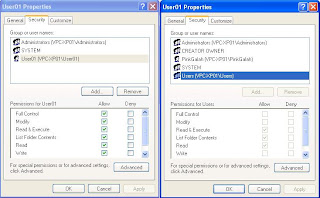 This clears shows the restored materials have fewer privileges than the original materials failing being a competent back up utility. This is a simulation of profile restoration.
Comodo Backup Version 2.2.127000.12
The user-interface is prettier than FBackup but it is also more confusing and functional lacking. With its user-interface, a user cannot workout how to get the program to remember the backup instructions so that one can reuse them again. However there are several ways this program that this program can do that, albeit not as intuitive as that for FBackup.
During the composition of the backup instruction using the wizard, you can use the Schedule definition to remember your instructions even if you do not want to do scheduled backup. You simply change the type to manual backup. Strange logic.
The other way is to export your backup instructions to a file which contains the command-line arguments corresponding to your instructions. With this file you can then use the /script command-line directive to supply the script file when launching the backup utility.
This utility has some slick facility allowing you to define the backup volume file format - such as including date, time etc. They call them macros and they are not available in FBackup. It also has facility for you to define the level of compression you want during backup.
Performance of this program is very good. However it suffers the same problem as in FBackup when it fails to reproduce precisely the ACLS as shown below:

Conclusion
These backup utilities are not really backup tools but specialized ZIP programs. It is not just because they are using ZIP format but because they left out the ACLS what they need to use to restore them
While NTBackup is available official in XP Pro and optionally in XP Home Edition, Microsoft has provided a cut-down version of this tool for Vista/Windows 7, called "Windows NT Backup - Restore Utility", so that user can restore from NTBackup volumes.
However, NTBackup has been known to run fine in Vista and in Windows 7 (and here). Since the 'installation' of NTBackup is so low impact, I will definitely give that a try. The big remaining question is: At what time in the future that Windows development will render our trusty friend not operable?
Let me describes the deficiency in Windows 7's "Backup and Restore" utility before I will describe my search result.
Microsoft has succeeded in taking a highly capable program called NTBackup and destroying it for the sake of some eye-candy screen. The Win7 backup is so slooooow that any ZIP program will beat it hands down. Not only that, the eye-candy stuff lacks any really useful progress information. It does not even bother to tell you how many files it has picked up, which file is processing, and the total size of the files being backup (until the whole thing is finished) or expected time to take, given that is a best-guess. Apart from some pretty looking screens, the user-interface is totally unintuitive and functionality lacking.
If you have not seen an industrial strength real back up utility, I suggest you fire up a copy of NTBackup in XP Pro or installed it in Home Edition.
One of the basic needs of a back up utility is to be able to add the back up information to what is already there like keeping revision so that you can go back several generations to restore the data.
Not only that a backup utility is as good as its restoration capability. It has to be able to restore the data accurately and precisely including restoring the original ACLS for the NTFS files and folders. Failure to do that can cause major problem and security risk. Imagine you are backing up the profile areas for a machine and has to do a disaster recovery only to discover that the resulting ACLS are all wrong!
A good backup utility also should ensure that the person running this must be a backup operator or one with the SeBackupPrivilege, to perform backup and SeRestorePrivilege, to perform restoration.
The other features commonly found in industrial strength backup utility is to be able to perform incremental backup so to reduce the backup volume. This is important when you are doing a daily backup.
Armed with these demands, I evaluated the following free backup programs: NTBackup, FBackup, and Comodo Backup.
Sadly only NTBackup managed to perform flawlessly managing to replicate the ACLS perfectly. Here is a screen shot of the source (left hand window) and restored folder's ACLS (right hand window):

FBackup4 Version 4.4 Build 207
This is a very simple to use free 'backup' utility. The good part of this one is its ability to manage several backup instructions as jobs in the program. It automatically increments the backup volume file name and the backup volume is in ZIP format. It is relatively fast.
However, it is a naive implementation of a backup utility. At best, it can only be classified as a ZIP program with a purpose-built user-interface.
Here is the screen shot of restoring the user's profile to an alternate location. Once again the left hand window shows the security settings of the original top level user profile folder and the right hand window shows that for the restored materials:

Comodo Backup Version 2.2.127000.12
The user-interface is prettier than FBackup but it is also more confusing and functional lacking. With its user-interface, a user cannot workout how to get the program to remember the backup instructions so that one can reuse them again. However there are several ways this program that this program can do that, albeit not as intuitive as that for FBackup.
During the composition of the backup instruction using the wizard, you can use the Schedule definition to remember your instructions even if you do not want to do scheduled backup. You simply change the type to manual backup. Strange logic.
The other way is to export your backup instructions to a file which contains the command-line arguments corresponding to your instructions. With this file you can then use the /script command-line directive to supply the script file when launching the backup utility.
This utility has some slick facility allowing you to define the backup volume file format - such as including date, time etc. They call them macros and they are not available in FBackup. It also has facility for you to define the level of compression you want during backup.
Performance of this program is very good. However it suffers the same problem as in FBackup when it fails to reproduce precisely the ACLS as shown below:

Conclusion
These backup utilities are not really backup tools but specialized ZIP programs. It is not just because they are using ZIP format but because they left out the ACLS what they need to use to restore them
While NTBackup is available official in XP Pro and optionally in XP Home Edition, Microsoft has provided a cut-down version of this tool for Vista/Windows 7, called "Windows NT Backup - Restore Utility", so that user can restore from NTBackup volumes.
However, NTBackup has been known to run fine in Vista and in Windows 7 (and here). Since the 'installation' of NTBackup is so low impact, I will definitely give that a try. The big remaining question is: At what time in the future that Windows development will render our trusty friend not operable?
Sunday, June 20, 2010
Virtual Machine software on Windows 7
Ever since Vista promoted that multiple level license pack - Home Edition, Professional/Business, Ultimate - Microsoft has been flagging certain programs "not supported" on cheaper edition.
This form of money grabbing exercise continues with Windows 7. Not contended with this, Microsoft actually turns up the confusion one more notch by introducing Windows Virtual PC as oppose to Virtual PC 2007 SP1.
Windows Virtual PC works fine with VM created in VPC2007. But one thing to remember, you cannot run Windows Virtual PC together with VPC2007sp1 on the same Windows.
When you install VPC200SP1 (just make sure Windows Virtual PC is uninstalled - go to 'Programs and Features' and then 'Turn Windows features on or off') on Windows 7 Home Edition, Windows will warn you that the program is not supported on this edition of Windows. Just ignore this as it works fine. It is Microsoft's way of tricking you to buy a more expensive edition. Read on for more virtual machines that do not practice this kind of scare tactic.
While running Windows Virtual PC, drag-drop from Host OS to Guest OS or vice versa does not seem to be working while VPC2007SP1 handles this operation without trouble. If you like the drag-drop feature, just use VPC2007SP1, which incidentally supports wider guest OS.
When running up the VPC2007SP1 console, it will display this lame warning message box:
 Just ignore this.
If you are concerned by this, check out this comprehensive review of other Virtual Machines available that are not concerned with which edition of your Windows 7 or Vista you are running on.
It is actually better to run non-Microsoft Virtual Machine because in this way you are guarantee a uninterrupted migration path to non-Microsoft Host OS machine. It is also interesting to note that VirtualBox can run 'XP Mode' VM.
After exploring these confusing situations, I have settled on using VM Player for serious stuff and to benefit from a much wider support of guest OS, leaving VPC2007SP1 to deal with my experimental VPC VM that I have accumulated.
This form of money grabbing exercise continues with Windows 7. Not contended with this, Microsoft actually turns up the confusion one more notch by introducing Windows Virtual PC as oppose to Virtual PC 2007 SP1.
Windows Virtual PC works fine with VM created in VPC2007. But one thing to remember, you cannot run Windows Virtual PC together with VPC2007sp1 on the same Windows.
When you install VPC200SP1 (just make sure Windows Virtual PC is uninstalled - go to 'Programs and Features' and then 'Turn Windows features on or off') on Windows 7 Home Edition, Windows will warn you that the program is not supported on this edition of Windows. Just ignore this as it works fine. It is Microsoft's way of tricking you to buy a more expensive edition. Read on for more virtual machines that do not practice this kind of scare tactic.
While running Windows Virtual PC, drag-drop from Host OS to Guest OS or vice versa does not seem to be working while VPC2007SP1 handles this operation without trouble. If you like the drag-drop feature, just use VPC2007SP1, which incidentally supports wider guest OS.
When running up the VPC2007SP1 console, it will display this lame warning message box:

If you are concerned by this, check out this comprehensive review of other Virtual Machines available that are not concerned with which edition of your Windows 7 or Vista you are running on.
It is actually better to run non-Microsoft Virtual Machine because in this way you are guarantee a uninterrupted migration path to non-Microsoft Host OS machine. It is also interesting to note that VirtualBox can run 'XP Mode' VM.
After exploring these confusing situations, I have settled on using VM Player for serious stuff and to benefit from a much wider support of guest OS, leaving VPC2007SP1 to deal with my experimental VPC VM that I have accumulated.
Saturday, May 15, 2010
How is NBN pricing compared with other country?
I am presently holidaying in HK and has just visited a friend who has just installed Fibre-To-Home service. It is interesting to compare what people in HK pays and that will be charged by iiNet and Exetel using NBN service.
HK is charging HK$99 (which is about AUD14) per month. Australia is one of those few rare countries that still imposes download limit. The HK service does not have download limit.
With is low cost, I am surprised to find in a building with 28 apartments, only 2 have taken up this kind of service. The installation fee is only HK$300 or AUD43 with a contract period of 2 years.
HK is charging HK$99 (which is about AUD14) per month. Australia is one of those few rare countries that still imposes download limit. The HK service does not have download limit.
With is low cost, I am surprised to find in a building with 28 apartments, only 2 have taken up this kind of service. The installation fee is only HK$300 or AUD43 with a contract period of 2 years.
Friday, May 14, 2010
Firefox kills Windows Journal Writer in Fujitsu T4310 Windows 7 Tablet
I am rather shocked and annoyed to discover that Firefox 3.6.3 causes the Windows Journal Note Writer to crash in a Fujitsu T4310 Tablet PC running Windows 7. Initially I suspected it was caused by the Adobe Flash plug-in in Firefox but after many hours of painful cycles of recovery to factory settings that I have managed to nail it down to Firefox.
The machine is brand new and hence I can afford to reset it back to factory settings when things goes wrong.
For those new to Tablet technology, Journal is a key component that allows user to scribble electronic ink onto a document. It can be a blank page to start with or you can print an existing document to the Journal so that you can scribble notes on it or to highlight parts. Without it operating a Tablet is pretty ordinary.
The machine is installed from distributed image and then connects to the Internet by WiFi to retrieve all the Windows updates current to May 13, 2010. At each stage, the Windows Journal is fired up to ensure that it can render the blank page and that I can print from say Adobe Reader/IE8 to a Journal file. The Windows Journal still works even when IE8's Adobe Flash plug-in is installed. During my experiment, Microsoft Security Essentials or AntiVirus are not installed.
The installation of Firefox 3.6.3 proceeds without any trouble. I cannot launch Windows Journal or print from any program that once works to Journal Note Writer the moment Firefox is installed. Printing from Firefox causes the Journal to crash.
All the crashes cause Event ID 1000 and pin-pointed to mostly "C:\Windows\System32\msvcrt.dll" or occasionally to "C:\Program Files\Windows Journal\NBDoc.dll". In all events, the exception code is 0xC0000005, which means Access Violation and the fault offset for MSVCRT is the same. Here is a typical Event message:
Finally, after I've uninstalled Firefox, I launched a command prompt that "Run as administrator" and to apply the following steps to recover the Windows Journal:
In the "C:\Program Files\Windows Journal" directory
1) Run
Regsvr32 /u NBDoc.dll
Regsvr32 NBDoc.dll
2) Run
Journal /repairnotewriter
If you happen to run the last command in a CMD running as the log in user, a message box will inform you that it cannot find the specific file.
3) Then reboot.
When the machine is restarted, you can try to bring up Journal. It may still crash or it may bring up the Windows Journal Recovery dialog box as the last one you tried to print from Firefox did not go to completion. Do not choose to recover and this should bring up the blank page. You can then close the Journal Writer to complete the recover process.
You may also choose to launch the Journal Writer with an existing JNT file when launching by itself fails.
After the Windows Journal is restored (with Firefox uninstalled of course) you can print from IE or any programs.
I have been a long time Tablet user and is still using my P1510 running XP with Firefox and I have never seen this bizarre interference.
If anyone has any idea what is exactly happening in the background causing them to be hostile to each other or similar bizarre interference, I would like to hear from you. If you have a way to fix this, it is even more welcoming.
The machine is brand new and hence I can afford to reset it back to factory settings when things goes wrong.
For those new to Tablet technology, Journal is a key component that allows user to scribble electronic ink onto a document. It can be a blank page to start with or you can print an existing document to the Journal so that you can scribble notes on it or to highlight parts. Without it operating a Tablet is pretty ordinary.
The machine is installed from distributed image and then connects to the Internet by WiFi to retrieve all the Windows updates current to May 13, 2010. At each stage, the Windows Journal is fired up to ensure that it can render the blank page and that I can print from say Adobe Reader/IE8 to a Journal file. The Windows Journal still works even when IE8's Adobe Flash plug-in is installed. During my experiment, Microsoft Security Essentials or AntiVirus are not installed.
The installation of Firefox 3.6.3 proceeds without any trouble. I cannot launch Windows Journal or print from any program that once works to Journal Note Writer the moment Firefox is installed. Printing from Firefox causes the Journal to crash.
All the crashes cause Event ID 1000 and pin-pointed to mostly "C:\Windows\System32\msvcrt.dll" or occasionally to "C:\Program Files\Windows Journal\NBDoc.dll". In all events, the exception code is 0xC0000005, which means Access Violation and the fault offset for MSVCRT is the same. Here is a typical Event message:
Log Name:      Application
Source:        Application Error
Date:          5/13/2010 11:55:08 AM
Event ID:      1000
Task Category: (100)
Level:         Error
Keywords:      Classic
User:          N/A
Computer:      ABCD-PC7
Description:
Faulting application name: journal.exe, version: 6.1.7600.16385, time stamp: 0x4a5bc80a
Faulting module name: msvcrt.dll, version: 7.0.7600.16385, time stamp: 0x4a5bda6f
Exception code: 0xc0000005
Fault offset: 0x00009c7f
Faulting process id: 0x14d4
Faulting application start time: 0x01caf25012163ca9
Faulting application path: C:\Program Files\windows journal\journal.exe
Faulting module path: C:\windows\system32\msvcrt.dll
Finally, after I've uninstalled Firefox, I launched a command prompt that "Run as administrator" and to apply the following steps to recover the Windows Journal:
In the "C:\Program Files\Windows Journal" directory
1) Run
Regsvr32 /u NBDoc.dll
Regsvr32 NBDoc.dll
2) Run
Journal /repairnotewriter
If you happen to run the last command in a CMD running as the log in user, a message box will inform you that it cannot find the specific file.
3) Then reboot.
When the machine is restarted, you can try to bring up Journal. It may still crash or it may bring up the Windows Journal Recovery dialog box as the last one you tried to print from Firefox did not go to completion. Do not choose to recover and this should bring up the blank page. You can then close the Journal Writer to complete the recover process.
You may also choose to launch the Journal Writer with an existing JNT file when launching by itself fails.
After the Windows Journal is restored (with Firefox uninstalled of course) you can print from IE or any programs.
I have been a long time Tablet user and is still using my P1510 running XP with Firefox and I have never seen this bizarre interference.
If anyone has any idea what is exactly happening in the background causing them to be hostile to each other or similar bizarre interference, I would like to hear from you. If you have a way to fix this, it is even more welcoming.
Subscribe to:
Posts (Atom)
