A site devoted to discussing techniques that promote quality and ethical practices in software development.

Saturday, October 2, 2010

Wonder which tablet is underachievers

The quality of technical reporting on the Internet has sunk with each passage of time, particularly on analyzing product like a Tablet computers. In addition to the previous one, another just surfaced by Dan Ackerman making unsubstantiated statements that
"these Windows tablets have not been very good. Some are slate-style devices, others are convertible laptops with swiveling screens--but all have been underachievers, to put it mildly."
He fails to define what criteria he uses to call them underachievers. In fact, the current crop of so-called Tablets are nothing more than the same kind used in check-out counters or information kiosk and should be termed as touch sensitive device.

It cannot write like Windows Tablet that stores the scribbles as searchable ink. It cannot write and convert to text as you write. It relies on a touch senstive keyboard, which has been found even in good old PDA, and in an integral part of Tablet Windows. In fact Tablet Windows has 2 touch sensitive keyboards - one fixed one and another floating one. The current crop of non-Windows touch sensitive devices cannot provide the user with the ability to annotate, scribble and mark up any documents.

Windows applications run without modification on tablets; my Firefox can use the tablet input and my Thunderbird, with GeckoTIP, works flawlessly. It offers developers ability to develop ink-aware applications that you can scribble on say a PDF or Word documents just like you can do to a printed document.

Sure the current crop of touch sensitive device has gesture to open, zoom, flick or rotate object. Windows 7 touch sensitive netbook and Tablets have that functionality in addition to use stylus to write. That kind of gimmicky stuff is nothing new but is a good bait for technical bloggers or reporters.

The only thing working against the current crop of Windows Tablet is the price. For a properly functioning tablet supporting stylus, it is a lot more expensive than touch sensitive only device. Until the screen cost can be reduced further, this handicap will continue to exist. No amount of software can overcome that.

As a long term Windows Tablet user, and is still using one to compose this blog, I have found the current crop of touch sensitive devices, like iPad, Dell Streak, even Windows touch sensitive netbook, lacking. The ability to write/scribble notes or to annotate pre-prepared document in a meeting or presentation provides a dimension these touch sensitive devices cannot meet.

The convertible type, degraded by Dan through his obvious lack of usage over a period of time - the one with a hardware keyboard - are the most versatile of the lots. While one can write, with some practice, comfortably a reasonably long document using the stylus, often time the keyboard can give you that much more speed and precision. Of course the current crop of touch sensitive devices like iPad are not composing devices for "business-oriented" operations and are more a presentation device, more like a large size iPod Touch. As a result, there is no need for a keyboard with feedback. In a convertible or hybrid kind the keyboard complement the stylus.

So who is lacking and underachieving - show me how to annotate a PDF on iPad or running something like Excel, Photoshop or other productivity suite on iPad like devices.

Friday, September 24, 2010

A review of Advanced Registry Optimizer 2010

I have been asked for an opinion of this tool called "Advanced Registry Optimizer 2010" (ARO) from Sammsoft. Since I have never used anything like that despite using Windows since 3.0, I decided to give it a try.

The one so 'generously' made available from its web site was only a nobbled version allowing one to correct up to 100 errors. This wasn't made clear in the download. Anyway, the version I tested was 6.0.743.796 and all tests were performed in two Virtual Machines whose guest OS's were: Windows XP SP3 and Windows 7 Ultimate. Furthermore all tests, other than installations, were carried out in LUA (Limited User Account) and disconnected from the network, just in case the program performs call-home operations.

I also deliberately created a key in HKCR\CLSID with incomplete and incorrect information. While the GUID was correct, the ProgID contained incorrect or missing data. This was to test how good this program was.

Although the installation was relatively straight forward there were two areas that were not very satisfactory:
  • The acceptance of askToolbar installation should be a bit more obvious.
  • After successful installation, it should not execute an automatic scan without user's instruction. It ran and I had to use tools like Process Explorer to terminate it immediately. Not nice.
As mentioned all runs were carried in LUA and the program was found to be faulty running in this kind of account settings. Since all programs in Windows 7 and Vista run with standard user security token by default, ARO's end result was identical to that running in XP LUA mode.

This observation was substantiated by comparing the run time log captured using Process Monitor when ARO was executed in XP SP3 and Windows 7.

It did not crash when running in LUA. It simply lied to the users telling them their system had fewer issues than it really was.

Take for example, the specially planned registry settings was not identified when ARO was running in LUA. The reason was that it tried to open the registry key HKCR\CLSID\<My-Test-GUID> with Read/Write access and failed due to lack of sufficient rights when executed in LUA.

The program simply swallowed the error and moved on. This was a very bad programming mistake. The return code was very specific of the problem and when the program was told access was denied, it should have immediately ceased processing and informed the user to run with administrative rights.

Instead, the program just treated that as a non-event and moved on. This resulted in a misdiagnosis.

You can easily test this without these tools. Run ARO in LUA and run it again with "As Administrator" and compare the findings. If the program is functioning correctly, it should report identical error. In this version, they differ drastically.

In fact, if you go to the settings and de-select all settings except "ActiveX and COM" and run it. The chance is that you will get a 0 error when running in LUA and non-zero with administrator's rights. This is because when it opens HKCR it demands Read/Write even in scanning mode. This indicates a possible programming error! Perhaps it is an innocent victim of the ATL registry library problem.

As a result, the product is not functioning.

Tuesday, September 7, 2010

Who creates the ASPNET account in XP?

I have been using a couple of XP VM for development and suddenly I have to develop some ASP.Net. The VMs did not have IIS installed and only has .Net Framework 2 SP2, 3.0, and 3.5 as well as VS2008.

After installing the IIS, I was having trouble to launch some ASP.Net application. Upon some investigation, ASPNET, the default account for IIS 5.1 in XP, was not there!

So who was responsible for creating it?

It turns that one needs to install .Net Framework 1.1 to create that account irrespective if IIS 5.1 is installed or not. What distracted me was the presence of v1.1.4322 sub-directory in the Framework as it turned out it was placed there when I installed .Net Framework 2.0 SP1.

It is not the same as running the installation script for .Net Framework 1.1.

Tuesday, August 24, 2010

Gpg4Win Fails in TChinese Windows

Further to my discovery of problem in Gpg4Win when the "Language for non-Unicode program" is not set to English, I decided to test it in Traditional Chinese Windows with "Language for non-Unicode program" set to same as the Unicode language (TChinese HK SAR) and to English US.

Sadly Gpg4Win will not allow me to enter passphrase when generating my key:

The captured screen shot did not show the mouse carot but it was actually inside the Passphrase edit box and no matter what I typed, nothing appearing.

The strange thing is that. I could enter my name and e-mail address, albeit very poor focusing handling, but only in the passphrase entry dialog did the program misbehave. This kind of misbehavior in part but not in other is common in this program.

Not deterred by this, my next test was to import a key that was generated in an English Windows XP. The import process worked fine.

But once again the Windows Explorer plug-in failed when I used the context menu to encrypt a small text file with the same misbehavior reported previously.

The next test is to use the File Manager (a rather clunky and clumsy user-interface. They should simply just make a Windows API call to invoke the familiar UI) from the GPA (GNU Privacy Assistance) to see if I could encrypt and decrypt the text file the loooooong way that could not be done via the Explorer plug-in.

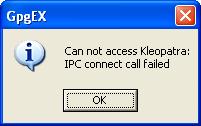
Once again, like other features in Gpg4Win, parts work and other parts fail. The annoying things are those operations that fail aren't some exotic rarely used ones. I could encrypt a text file but when I tried to decrypt it, I was met with this familiar dialog box:
The content showed the correct armor text. To prove that the file was correctly encrypted, I took this file to an English Windows and it decrypted it fine. This clear shows another bug in Gpg4Win.

Conclusion:
Gpg4Win 2.0.4 does not work in a non-English Windows or English Windows with non-English language for "Language for non-Unicode program" settings.

Sunday, August 15, 2010

GPG3Win 2.0.4 Windows Explorer Context menu still fails to work

This is my pet project to see how long it takes Gpg4Win to produce a Windows Explorer context menu that is capable to encrypt and decrypt files.

My test environment is XP Pro SP3 (English Windows) with HK SAR as the language setting for non-Unicode Programs. Gpg4Win's explorer context menu fails to encrypt and decrypt a file producing the following familiar dreaded message box:

To get this feature working one has to change the "Language for non-Unicode program" is set to English. This is an unnecessary demand clearly indicating a lack of Internationalization Programming prowess. It presents great inconvenience to non-English speaking Windows users. Sad to see this bug still lingering on for so long.

It is another case of using 'It-works-here' development methodology.

Tuesday, August 3, 2010

Some people just writing rubbish on the Internet

Consider this totally inaccurate and ignorant statement by Jason Hiner on ZdNet:
No Windows 7 tablets have hit the market, or even been officially announced.
Jason has either lived in the wilderness for the last few years or so ignorant to make such a statement. No Windows 7 tablet?

Is he joking? I was using one and listed on Fujitsu's product site. There are plenty of Windows 7 touchy type of touch-screen only device too if he cares to investigate. All of them can do that silly gesture to open and flick. The T4310 can do both - touch sensitive as well as using stylus to write in ink - something iPad can't do.

Just because Apple brought out a touch-sensitive device, just like those in use in check out counters, so may so called tech journalists are totally confused.

It is like saying a vehicle is not a car if it does not look like a Mini while accusing Toyota and Land Rover has yet to produce a car!

Monday, August 2, 2010

Important to set up a subversion repository correctly

To use Subversion effectively, one needs to sit down and plan the organization of the repository layout. "Version Control with Subversion" book page 16, recommends:
While Subversion's flexibility allows you to lay out your repository in any way that you choose, we recommend that you create a trunk directory to hold the “main line” of development, a branches directory to contain branch copies, and a tags directory to contain tag copies. For example:
$ svn list file:///var/svn/repos
/trunk
/branches
/tags
Failure to adhere to this recommendation can bring lots of grief later on. Often when you start off a project, you may not anticipate that you may need tags or branches and hence you start importing file directly into the repository at the root. Like this:

Then one day you decide to start using tags to record interesting events. Where do you now put it? Let's create a directory called Tags and put it there, like this:

Now you may think this fixes the problem. Not quite. If some one decides to check out the trunk, this is what you will end up with:

Now you do not only get the files for the trunk but also files associated with every tags you have in the repository. In this demo, I only have one tag.

While it is not a dead loss, you can still fix this situation. First get everybody to check in everything first.

Then create three separate directories in the repository, 2 are of immediate need, as Trunk, Tags and Branches directly below the root. Staying with the recommended names and structures benefit everybody and avoid misunderstanding.

Select all the trunk directories, excluding Branches, Trunk, or Tags folders, and move them into the Trunk sub-directory.

Check the Trunk out to a different directory on your local drive. it is best not to use your old copy anymore. Then tag that immediately so that you know this important event in correcting the repository directory structure. Of course you store the tag in the Tags sub-directory.

These steps are totally unnecessary if it is done immediate after the creation of the repository.

Blog Archive